The word APK puts people off, and understandably so. You go to download the KK8 Android app, and instead of the familiar Play Store button you get a file, a warning from Chrome, a settings screen asking for permission, and possibly a second warning from Google Play Protect afterwards. None of that happens when you install an ordinary app, so it is reasonable to stop and ask what is going on.
This guide explains what an APK is in plain terms, what the KK8 APK contains, why the app is distributed this way, and how to tell an official file from a repackaged one. It is not an installation guide. If you already understand the format and just want the file, go to the KK8 App Download page.
Quick Answer
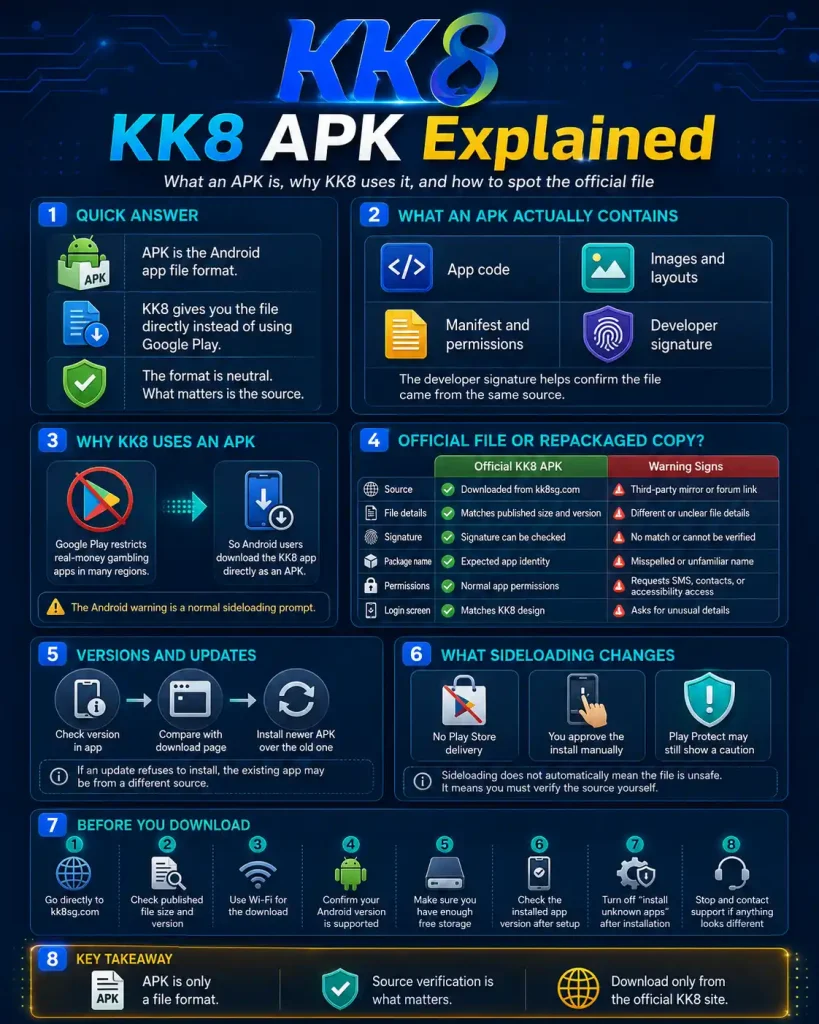
An APK, short for Android Package Kit, is simply the file format Android uses to install applications. Every Android app you have ever installed arrived as an APK, including the ones from the Play Store. The only difference here is delivery: the Play Store downloads and installs the APK for you in the background, while KK8 gives you the file directly and lets you install it yourself.
The KK8 APK contains the app’s code, its images and layouts, its list of requested permissions, and a digital signature from the developer. That signature is the important part. It is what lets Android confirm that an update came from the same source as the original install, and it is what you can check to confirm a file genuinely came from KK8 rather than from someone imitating it. The format itself is neither safe nor unsafe. What matters is where the file came from.
What an APK Actually Contains
Opening an APK is much like opening a zip archive, because that is essentially what it is. Inside you would find four things that matter to a user.
The compiled application code, which is the app itself. The resources, meaning the images, layouts, fonts and text that make up the interface. The manifest, which is a declaration of what the app is and what it wants access to, including the permission list. And the signature block, which is a cryptographic stamp applied by the developer.
The manifest is worth understanding because it is your best signal of whether a file is behaving. An app can only use permissions it declares there, and Android shows you those declarations. If a gambling app requests access to your SMS messages or your contacts, that request appears in the manifest, and there is no legitimate reason for it. This is why checking which permissions the app requests tells you more than any download-page reassurance.
Why KK8 Distributes an APK Instead of a Play Store App
The short version is policy, not capability.
Google Play restricts real money gambling applications across most territories, and where it does allow them it requires operator licensing specific to each country plus a separate application process. The restriction applies to the whole category. It is not a judgement about any particular operator, and it is not a sign that an app failed a security review. Plenty of licensed gambling operators worldwide distribute Android apps outside the Play Store for exactly this reason.
Apple applies different rules, which is why the iOS route differs from the Android one. The full explanation of the Play Store position covers how the policy works and which regions it affects.
The practical consequence for you is that Android treats the file as coming from an unverified source, so it asks for your explicit approval before installing. That prompt is the system doing its job. It appears for every sideloaded app regardless of what the file contains.
Official File or Repackaged Copy
This is the part that actually matters, and it is where most of the genuine risk sits.
The risk with sideloading is not the format. It is that anyone can take a legitimate app, modify it, re-sign it with their own certificate, and host it on a mirror site that looks plausible. Gambling apps are a common target because a modified login screen captures credentials that lead directly to money. Search results for APK downloads are full of these mirrors, and several of them rank well.
The defence is straightforward. Download only from kk8sg.com, and check the file against the details published there.
|
Check |
Official KK8 APK |
Warning sign |
|---|---|---|
|
Source |
kk8sg.com only |
Any third party APK mirror or forum link |
|
File size |
10 MB |
Differs noticeably from the published size |
|
Signature fingerprint |
[SHA-256] |
Does not match, or cannot be checked |
|
Package name |
[com.example.kk8] |
Slight misspelling or an unfamiliar prefix |
|
Permissions requested |
[storage, notifications, camera] |
SMS, contacts or accessibility services |
|
Login screen |
Matches the website |
Asks for details KK8 never requests |
If you have already installed a KK8 app from somewhere other than the official site, uninstall it, change your password from a different device, and contact support. Guidance on identifying a repackaged file goes into more detail on what these mirrors typically change.
Versions and Updates
Every APK carries a version number, and this is where sideloading creates the most day to day friction.
Play Store apps update themselves quietly in the background. A sideloaded app does not. Nothing tells you a new version exists, so you keep running whatever you installed until you go looking. This causes more support problems than anything else in the app: sessions that expire immediately, games that fail to load, payment screens that error out. In most of those cases the app is simply several versions behind.
Checking takes a few seconds. Open the app, go to Profile then About, and compare the number shown against the version published on the download page. If yours is older, you install the newer APK over the existing app rather than uninstalling first, which preserves your login and settings.
One detail specific to the format: Android will only allow an update to install over an existing app if both files carry the same developer signature. This is a deliberate safeguard. If an update refuses to install, it usually means the existing app came from a different source, which is worth investigating rather than working around.
What Sideloading Actually Changes
It is worth being precise here, because both the alarmist and the dismissive versions of this are wrong.
Installing from outside the Play Store removes one layer of automated scanning. Google reviews apps submitted to Play and scans them for known malware patterns. That check does not happen for a file you download directly. It does not mean the file is dangerous. It means the responsibility for judging the source has moved from Google to you.
Google Play Protect still runs on your device and still scans installed apps, including sideloaded ones. If it flags the KK8 app after installation, that is a category level caution about the install method rather than a detection of anything specific in the file.
A sensible habit is to switch the “install unknown apps” permission back off once installation finishes. You granted it to your browser, not to KK8, and leaving it enabled means any future download can prompt to install. It takes about ten seconds. The broader question of whether the KK8 app is safe to install is covered separately and in more depth.
Before You Download: Checklist
- Go to kk8sg.com directly rather than through a search result for “KK8 APK”.
- Note the published file size and version before downloading.
- Download on Wi-Fi. Large APK downloads frequently fail part way on mobile data.
- Check your Android version meets the minimum of [X.X].
- Confirm you have at least [XXX] MB free.
- After installing, compare the app version under Profile then About against the site.
- Turn the “install unknown apps” permission back off.
- If anything looks different from the description above, stop and contact support.
Frequently Asked Questions
Is an APK a virus?
No. An APK is just the Android installation format, the same one the Play Store uses behind the scenes. The format carries no risk in itself. The risk comes entirely from downloading a modified copy from an unofficial source.
Why does Chrome warn me about the file?
Chrome shows that warning for every APK download, on every site, because the file type can install software. It is not a scan result and it does not indicate a problem with the specific file.
Can I check the KK8 APK before installing it?
Yes. Compare the file size against the published figure, and check the signature fingerprint against the one listed on the download page. Several free APK inspection tools display the signature without installing the app.
How do I get the latest KK8 APK version?
Download it from the official KK8 download page, which lists the current version number and release date. Android does not update sideloaded apps automatically, so you need to check periodically.
Does the APK version differ from the iOS app?
The account, balance and game catalogue are identical. Some device level features such as biometric options may work differently. Check the app’s own settings rather than assuming full parity.
Responsible Gaming
You must be 21 or older to hold a KK8 account. Deposit and time limits, plus self exclusion, are available under Profile then Responsible Gambling. If gambling is causing difficulty for you or someone close to you, the National Council on Problem Gambling in Singapore operates a helpline on 1800-6-668-668.