Is an APK download safe? The question comes up the first time an app asks you to install a file instead of using the Play Store, and the answers you find online tend to be either dismissive or alarmist. Neither is much help when you are staring at a warning dialogue trying to decide.
The accurate answer is that the format carries no risk at all, the delivery method removes a layer of checking, and the source you download from determines almost everything. That is less satisfying than a yes or a no, but it is the version that lets you actually make a decision.
This guide explains what sideloading is, what it changes about your exposure, how to verify a file before installing it, and when the sensible answer is not to install anything. It applies to any Android app distributed outside the Play Store, not only ours.
Quick Answer
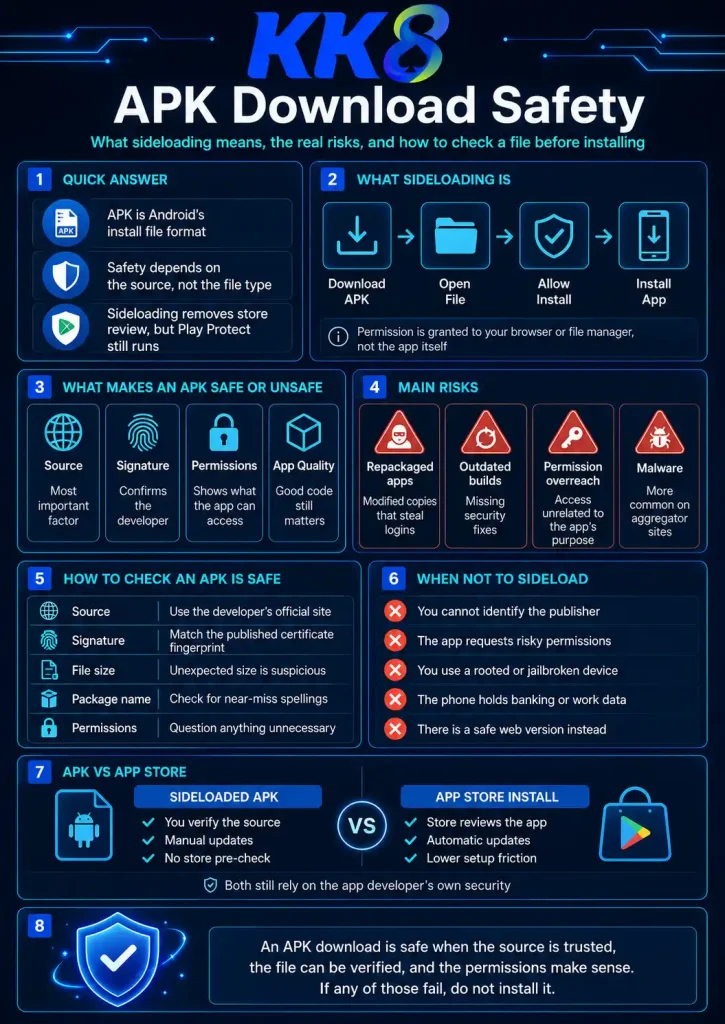
An APK is simply the file format Android uses to install applications. Every app on your phone arrived as one, including everything from the Play Store. The store just handles the download and installation for you rather than handing you the file.
So an APK download is safe or unsafe depending entirely on where it came from. A file from the developer’s own website carries roughly the risk of that developer. The same file from an aggregator site carries the risk that someone modified it in between. There is no way to tell the two apart by looking, which is why verification matters.
What sideloading genuinely costs you is one layer of automated pre-publication scanning that Google applies to apps it distributes. What it does not cost you is on-device protection, which keeps running regardless of how an app was installed. The practical effect is that responsibility for judging the source moves from Google to you.
What Sideloading Actually Is
Sideloading means installing an application from somewhere other than the official app store for your device. On Android it is a documented, supported function rather than a workaround, which is why the operating system provides a permission dialogue for it instead of blocking it outright.
The mechanics are straightforward. You download an APK file, open it, and Android’s package installer asks whether you want to allow installations from whichever app the file came from, usually your browser or file manager. You grant that, the app installs, and you can revoke the permission afterwards.
Two points people commonly get wrong. First, granting “install from unknown sources” gives that permission to your browser, not to the app you are installing. Second, the warning Android shows is generic. It appears for every sideloaded file regardless of contents, and it is not the result of scanning anything.
Developers sideload for legitimate reasons: beta builds, enterprise apps, regional availability, and app categories the store restricts. Real money gambling is one of those categories, which is why some licensed operators distribute directly rather than through Google Play.
What Makes an APK Download Safe or Unsafe
Four factors, in descending order of how much they matter.
The source, by a wide margin. A file from the developer’s own domain is as trustworthy as the developer. A file from an aggregator, a forum, a messaging group or a search result you did not verify has passed through hands you cannot account for. Most bad outcomes trace back to this single factor.
The signature. Every Android app is signed with a developer certificate. Modifying a file invalidates that signature, so a repackaged copy must be re-signed with someone else’s certificate. If the developer publishes their fingerprint, comparing it is the most reliable check available and cannot be faked.
The permissions. An app can only use what it declares. A file requesting access unrelated to its function is the clearest behavioural signal something is wrong. What each permission means is covered in this breakdown of app permissions, which uses one app as the example but applies generally.
The app’s own quality. The distribution method says nothing about whether an app is well built or its developer trustworthy. A sideloaded app from a serious company can be safer than a poorly maintained one in the store.
Is an APK Download Safe by Default? The Real Risks
Ranked by how often they actually cause harm.
Repackaged apps. The dominant risk. Someone takes a legitimate app, modifies the login screen or adds code to forward credentials, re-signs it, and hosts it somewhere that ranks well. Banking, payment and gambling apps are preferred targets because credentials convert straight to money. The full detection method is in the guide to spotting a modified APK.
Outdated builds. Underrated and very common. Aggregator sites host versions that are months or years old, missing security fixes the developer has long since shipped. Because sideloaded apps do not update themselves, an old file stays old until you replace it.
Permission overreach. Apps requesting access far beyond their function. Accessibility services are the most abused, because that permission can read screen content and tap on your behalf, which is enough to observe a password being typed and then act as you.
Outright malware. Real but rarer than the reputation suggests, and mostly encountered on aggregator sites and in files shared through messaging apps. Play Protect still scans sideloaded apps on your device, so this is the risk with the most remaining defence, and what its warnings actually mean is worth understanding.
How to Check an APK Download Is Safe
Five checks, in the order that resolves the most cases fastest.
|
Check |
How |
Weight |
|---|---|---|
|
Source |
Type the developer’s domain or use a bookmark, never a search result for “app name APK” |
Highest |
|
Signature |
Compare the certificate fingerprint against what the developer publishes, using a free APK inspection tool |
High |
|
File size |
Match against the published figure. Modified files are usually larger |
Medium |
|
Package name |
Check character by character for near-miss spellings or odd suffixes |
Medium |
|
Permissions |
Read the declared list before installing, not after. Question anything unrelated to the app’s purpose |
High |
The signature check is the one most people skip and the one that would prevent most incidents. Free APK inspection tools display it without installing anything, so it costs a couple of minutes and requires no technical knowledge beyond comparing two strings. What else sits inside the file is explained in this breakdown of APK contents.
Two habits worth adopting alongside the checks. Download on Wi-Fi, since interrupted downloads produce corrupted files that fail confusingly. And switch the unknown sources permission back off once installation finishes, so no future download can prompt an install. Both steps appear in this step-by-step installation walkthrough.
When an APK Download Is Not Safe Enough
Sometimes the right answer is not to install. Situations where sideloading is a bad idea regardless of the file:
You cannot identify the publisher. If there is no company behind the app that you can name and look up, no verification helps, because there is nothing to verify against.
The developer publishes no verification details. No fingerprint, no file size, no version number means the checks above cannot be performed at all. That absence is itself informative.
It is a work or shared device. Sideloading on a device that holds someone else’s data, or that is managed by an employer, is not a decision that is yours alone to make.
The device is rooted. Rooting removes the isolation that keeps one app’s data away from another’s, which multiplies the consequences of a bad install.
A web version does the job. Many services offer a mobile site or a home-screen web app that covers most of what the native app does. If you only need the core functionality occasionally, that route carries none of this risk. It is worth checking whether one exists before deciding you need the file at all.
APK Download Safety vs App Store Distribution
|
App store |
Sideloaded APK |
|
|---|---|---|
|
Pre-publication scanning |
Yes |
No |
|
On-device scanning |
Yes |
Yes, Play Protect still runs |
|
Automatic updates |
Yes |
No, manual |
|
Publisher verification |
By the store |
By you |
|
Permission visibility |
On the listing |
In the file, before install |
|
Removal if malicious |
Store can pull it |
Stays until you uninstall |
The most consequential row is updates. A store-distributed app receives security fixes without you doing anything. A sideloaded one does not, which makes checking for new versions periodically part of the safety picture rather than a housekeeping detail.
Frequently Asked Questions
Are APK files safe to download?
The format is neutral. Every Android app is an APK, including store ones. Safety depends on the source, the signature and the permissions, not on the file type.
Will my phone get a virus from an APK?
Not from a verified file taken from the developer’s own site. The risk lies with aggregator sites, forum links and files shared through messaging apps, where modification is common and provenance is absent.
Why does Android warn me every time?
The warning reflects the installation method, not the file. It appears identically for every sideloaded app and is not the output of any scan.
Is it safe to install an APK from a mirror site?
No, as a rule. Some mirrors host unmodified files, but you have no way to tell which, and even genuine files there are usually outdated. There is no benefit that offsets the uncertainty.
Does Play Protect still work on sideloaded apps?
Yes. It scans applications on your device regardless of origin. What you lose is the pre-publication review, not the ongoing protection.
How do I know a specific app is worth installing?
Identify the publisher, verify the file against details they publish, and read the permissions before granting them. For a worked example of that process applied to one app, see this app safety assessment, or go directly to the official download page for the file and its published verification details.
Responsible Gaming
You must be 21 or older to hold a KK8 account. Deposit and time limits, plus self exclusion, are available under Profile then Responsible Gambling. If gambling is causing difficulty for you or someone close to you, the National Council on Problem Gambling in Singapore operates a helpline on 1800-6-668-668.