Installing the KK8 APK on Android takes about two minutes, and roughly ninety seconds of that is reading warnings. Your browser will caution you about the file type. Android will block the install and send you to a settings screen. Google Play Protect may add a note of its own afterwards.
None of those indicate a problem with the file. They are what Android shows for anything installed outside the Play Store, and they appear identically whether the app came from a major developer’s own site or from somewhere far less careful. Knowing which is which is the actual skill, and it starts with where you download from.
This guide covers each step, explains what every prompt means, and covers what to do when one of them fails. The file itself is on the KK8 App Download page.
Quick Answer
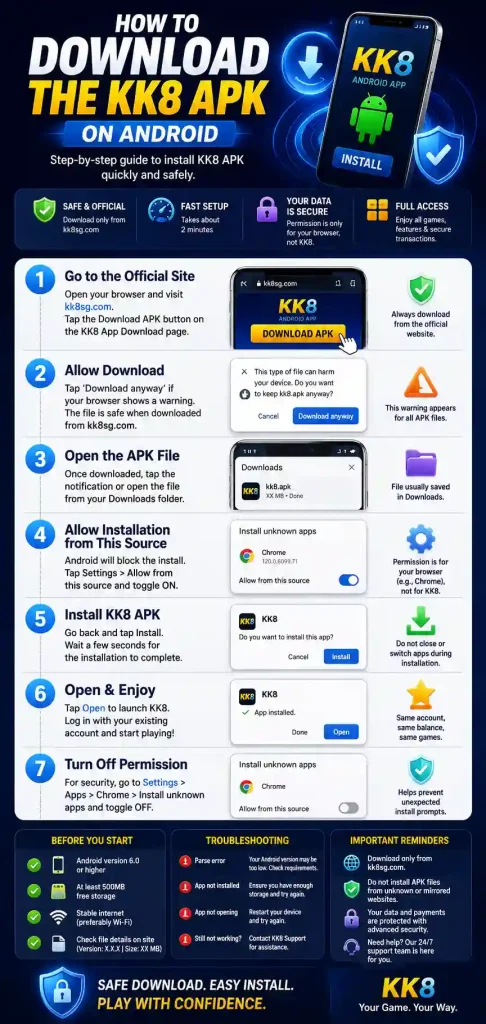
To install the KK8 APK on Android: download the file from kk8sg.com, tap the download notification to open it, allow installation from that source when Android prompts you, tap Install, then switch the permission back off.
The permission you grant belongs to your browser rather than to KK8. You are telling Android that Chrome, or whichever app delivered the file, may trigger an installer. Turning it off afterwards takes ten seconds and prevents any future download from prompting to install.
One thing to get right before you start: download only from kk8sg.com. Search results for APK downloads are full of mirror sites hosting modified copies of gambling apps, and no amount of careful installation protects you from having started with the wrong file.
Before You Download the KK8 APK on Android
Five things worth checking first. Skipping them is where most failed installs originate.
Check your Android version. Settings, then About phone. The app requires Android [X.X] or higher. An older version will let the file download and then fail at install, usually with a parsing error that says nothing about compatibility. Full specifications are in the system requirements guide.
Check your free storage. You need more than the file size, because Android holds both the APK and the unpacked application during installation. Allow at least [XXX] MB free rather than the [XX] MB the download suggests.
Get on Wi-Fi. Large downloads over unstable mobile data are the most common cause of a corrupted file, which then fails to install for reasons that look unrelated.
Note the published file details. Version [X.X.X] and file size [XX] MB, as listed on the download page. You will compare against these afterwards.
Have your login ready. You do not need a new account. The app uses the same credentials as the website.
How to Install the KK8 APK on Android: Step by Step
Step 1. Download the file. Go to kk8sg.com and tap the Android download button. Type the address or use a bookmark rather than arriving through a search result. When Chrome warns that this file type can harm your device, tap Download anyway. That warning appears for every APK on every site and is not the result of scanning anything.
Step 2. Open the file. Tap the download notification when it completes. If the notification has gone, open your Files app and look under Downloads for KK8_[VERSION].apk. Check the file size matches [XX] MB before continuing. A significant difference means the download was incomplete or the file is not ours, and the reasons that matter are covered in the guide to what an APK contains.
Step 3. Allow installation from this source. Android will block the install and offer a Settings button. Tap it, turn on Allow from this source, then press back. You are granting this to the app the file came from, meaning Chrome or Files, not to KK8. Android will now return you to the install screen.
Step 4. Install. Tap Install. This takes a few seconds. Before confirming, Android may show the permissions the app declares. Reading them is worthwhile, and what each one is for is set out in the permissions guide.
Step 5. Open the app and sign in. Tap Open, then log in with your existing KK8 credentials. Your balance, bet history and verification status carry across from the website unchanged.
Step 6. Turn the permission back off. Go to Settings, Apps, Special app access, Install unknown apps, and switch off the browser you used. Leaving it enabled means any future download can prompt for installation, including one you did not intend. This step is optional in the sense that the app works either way, and worth doing in the sense that it costs ten seconds.
What Each Warning Actually Means
The prompts are the part people find alarming, so here is what each one is telling you.
“This type of file can harm your device.” From Chrome, shown for every APK download without exception. It describes the file category, not the file. Chrome has not examined the contents.
“For your security, your phone is not allowed to install unknown apps from this source.” Android’s default position is that only the Play Store may install software. This prompt asks whether you want to make an exception for the app delivering the file. It is a permission request, not a warning about the app.
A Play Protect notice after installation. Play Protect scans apps on your device regardless of origin. A generic notice about an app installed from an unknown source is a category-level caution. A specific detection naming a threat is a different matter entirely, and the guide on Play Protect warnings covers how to tell them apart.
What none of these tell you is whether the file is genuine. That comes from where you downloaded it and from comparing the size and signature against what is published. The fuller treatment is in whether the KK8 app is safe to install.
After Installing the KK8 APK on Android
Three things worth doing while you are still thinking about it.
Confirm your version. Open the app, go to Profile then About. It should match the version published on the download page. If it does not, you have an older file, probably from a mirror site.
Delete the APK from Downloads. The installer file serves no purpose once the app is installed and occupies [XX] MB doing nothing.
Set a reminder to check for updates. This matters more than it sounds. Sideloaded apps do not update themselves, so nothing will tell you when a new version arrives. Running an outdated build is the single most common cause of login failures and payment errors that get reported as bugs. Checking monthly is enough, and the process is in the update guide.
Optionally, enable biometric login under Profile then Security, which makes subsequent sign-ins take about a second.
If Installing the KK8 APK on Android Fails
The four common failures and where to go.
“App not installed.” Usually a leftover copy of an older version signed differently. Uninstall any existing KK8 app, restart the phone, and try again. Full diagnosis is in the install failure guide.
“There was a problem parsing the package.” Either the download is incomplete or your Android version is below the minimum. Delete the file, check your version, and download again on Wi-Fi. Covered in the parse error guide.
The install is blocked even after granting permission. Some manufacturers, particularly Xiaomi, Huawei and certain Samsung security suites, apply a second block at device level. Check the phone’s own security app for an additional toggle.
The download stops part way. Switch to Wi-Fi, clear your browser downloads, confirm you have enough free space, and retry.
Frequently Asked Questions
Is it safe to download the KK8 APK on Android?
From kk8sg.com, yes. The risk lies with mirror sites, which sometimes host modified copies of gambling apps. Verify the file size and signature against what is published.
Why is the app not on the Google Play Store?
Play policy restricts real money gambling apps by country and licence, so the Android version is distributed directly. Apple applies different rules, which is why the iOS route differs.
Do I have to leave “unknown sources” turned on?
No. Once the app is installed the permission is no longer needed, and switching it off prevents future downloads from prompting to install.
Will installing the app affect my existing account?
No. The app connects to the same account and balance as the website. Nothing needs transferring.
How do I know I have the latest version?
Check Profile then About inside the app against the version listed on the download page. Android will not tell you when a new one is released.
What if my phone cannot run the app?
Use the H5 web version. Open the site in your browser or add it to your home screen. Full account access, no installation, and it works on devices below the app’s minimum specification.
Responsible Gaming
You must be 21 or older to hold a KK8 account. Deposit and time limits, plus self exclusion, are available under Profile then Responsible Gambling. If gambling is causing difficulty for you or someone close to you, the National Council on Problem Gambling in Singapore operates a helpline on 1800-6-668-668.