If you have been playing on KK8 through your phone browser, you have probably seen a prompt asking you to install the app. It is a reasonable thing to be cautious about. The Android version does not come from the Google Play Store, the download is an APK file, and your phone will show you a warning during installation.
This guide explains what the KK8 app actually is, how the Android, iOS and web versions differ, what you can do inside it, and whether you need it at all. By the end you should be able to decide which version suits your device, or whether you are better off staying with the mobile site.
Quick Answer
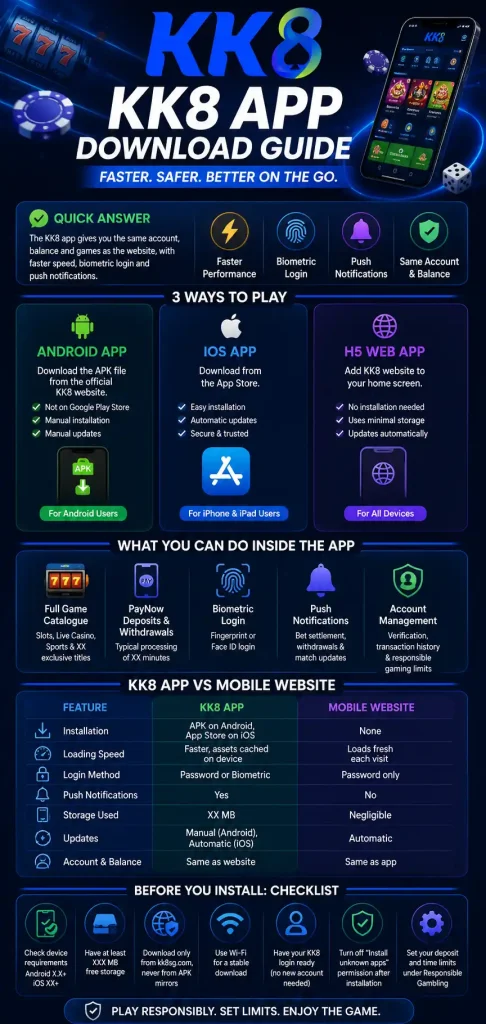
The KK8 app is the mobile version of the KK8 Singapore platform. It gives you the same account, the same balance and the same games as the website, but in an application that runs directly on your phone rather than through a browser tab. It comes in three forms: an Android app distributed as an APK file from the KK8 App Download page, an iOS app from the App Store, and an H5 web app that you add to your home screen without installing anything.
The main practical differences from the mobile site are speed, biometric login and push notifications. The app caches game assets on your device, so tables and slots open faster on repeat visits. You can sign in with a fingerprint or Face ID instead of typing a password. And you get alerts when a bet settles or a withdrawal completes. Nothing on the app is exclusive to the point where the website becomes unusable, so the app is a convenience upgrade rather than a requirement.
What the KK8 App Actually Is
The KK8 app is a client application. It is not a separate service or a separate account system. When you log in, you are connecting to the same platform the website connects to, which means your balance, your bet history, your verification status and your bonus eligibility all carry across without anything needing to be transferred.
This matters because a common worry is that installing an app means starting again, or that money held in a web account will not appear in the app. It will. If you register on the website and then install the app, you log in with the same credentials and everything is where you left it. The reverse is also true.
What the app changes is how the interface is delivered. A browser has to download the layout, images and game assets each time you visit. An installed app keeps most of that on your device, so it only fetches the parts that change. That is where the speed difference comes from, and it is most noticeable on a slower connection or an older phone.
Android, iOS and H5: Three Different Things
People use “the KK8 app” to mean three fairly different products, and knowing which one you are dealing with saves a lot of confusion.
The Android app (APK)
On Android, KK8 distributes the app as an APK file downloaded directly from kk8sg.com. It is not on the Google Play Store, because Play policy restricts real money gambling applications in most regions. That restriction applies to the category, not to KK8 specifically.
Because the file comes from outside the Play Store, Android will ask you to approve the installation manually, and Google Play Protect may show a warning afterwards. This is a category level caution about installing apps from outside the store, not a scan result about the file itself. The tradeoff is that the Android app does not update automatically, so you need to install a newer APK over the old one when a new version is released.
The iOS app
On iPhone and iPad, the app installs from the App Store in the ordinary way and updates itself. There is no APK, no manual permission and no security prompt. Some features available on Android may not be present on iOS, so check the app’s own settings rather than assuming parity.
The H5 web app
The third option is not really an app at all. You open kk8sg.com in Safari or Chrome, add it to your home screen, and it launches full screen without the browser address bar. It looks and behaves much like an installed app, uses almost no storage, and updates automatically because it is simply the website.
The H5 route is worth knowing about if you are not comfortable installing an APK, if your phone is low on storage, or if you are using a shared device. You lose biometric login and push notifications, but you keep full access to your account.
What You Can Do Inside the App
The feature list is close to the website, with a handful of additions that only make sense on a phone.
- Full game catalogue covering slots, live casino and sports betting, plus titles that appear only in the app.
- PayNow deposits and withdrawals handled inside the app, with typical processing of [XX] minutes. [Confirm with the payments team.]
- Biometric login using fingerprint or Face ID after your first sign in, set under Profile then Security.
- Push notifications for bet settlement, completed withdrawals and matches you are following.
- Account management including verification document upload, transaction history and responsible gambling limits.
One claim to treat carefully is offline play. Live games are streamed from a server, so they cannot run without a connection. If you see marketing suggesting otherwise, read it as referring to cached menus rather than actual gameplay.
KK8 App vs the Mobile Website
The honest summary is that the app is faster and more convenient, while the website is simpler and requires no trust decision about installing files. Neither locks you out of your account. The full feature by feature comparison goes into more detail, but the short version looks like this.
|
Feature |
KK8 App |
Mobile Website |
|---|---|---|
|
Installation |
APK on Android, App Store on iOS |
None |
|
Loading speed |
Faster, assets cached on device |
Loads fresh each visit |
|
Login method |
Password or biometric |
Password only |
|
Push notifications |
Yes |
No |
|
Storage used |
10 MB |
Negligible |
|
Updates |
Manual on Android, automatic on iOS |
Automatic |
|
Account and balance |
Same as website |
Same as app |
Is the KK8 App Safe?
The question really has two parts, and they deserve separate answers. This section is a summary. If safety is your main concern, the dedicated guide on whether the KK8 app is safe to install covers it properly.
The first part is whether the file itself is legitimate. The APK published on kk8sg.com is signed with the KK8 developer certificate, fingerprint [SHA-256]. You can check any KK8 APK against that fingerprint. The risk is not the official file, it is the copies. Third party APK mirrors sometimes repackage gambling apps to capture login details, which is why the download should only ever come from the official site.
The second part is whether sideloading is sensible in general. Installing outside the Play Store does remove a layer of automated checking, so the source you download from is doing work the store would otherwise do. A reasonable habit is to switch the “install unknown apps” permission back off after the installation finishes, which takes about ten seconds and stops future downloads from prompting. It is also worth knowing which permissions the app actually requests, since an unexpected one is the clearest sign a file did not come from KK8.
Before You Install: Checklist
- Confirm your device meets the minimum requirements: Android 12.1 or higher, or iOS 17.5 or newer.
- Check you have at least [XXX] MB of free storage.
- Download only from kk8sg.com, never from an APK mirror.
- Confirm you are on Wi-Fi, since large APK downloads often fail on unstable mobile data.
- Have your existing KK8 login ready. You do not need a new account.
- After installing, turn the “install unknown apps” permission back off.
- Set your deposit and time limits under Profile then Responsible Gambling.
Frequently Asked Questions
Do I need a separate account for the KK8 app?
No. The app, the website and the H5 version all use one account and one balance. Log in with your existing details and everything carries across.
Why is the KK8 app not on the Google Play Store?
Google Play policy restricts real money gambling apps across most regions, so the Android version is distributed directly as an APK. The App Store applies different rules, which is why the iOS route differs.
Does the KK8 app cost anything?
The app is free to download and install on both Android and iOS. Standard mobile data charges apply if you are not on Wi-Fi.
How do I know if I have the latest version?
Open the app and go to Profile then About. Compare the number shown there against the version listed on the KK8 app download page. On Android you update by installing the newer APK over the existing app, without uninstalling first.
Can I use KK8 without installing anything?
Yes. Open kk8sg.com in your mobile browser, or add it to your home screen as an H5 web app. You keep full account access and lose only biometric login and push notifications.
Responsible Gaming
You must be 21 or older to hold a KK8 account. Deposit and time limits, plus self exclusion, are available under Profile then Responsible Gambling. If gambling is causing difficulty for you or someone close to you, the National Council on Problem Gambling in Singapore operates a helpline on 1800-6-668-668.