The KK8 app Android vs iOS comparison is unusual in that most readers are not really choosing. You have the phone you have, and the question is not which platform to pick but what to expect on yours, and whether the other side gets something you do not.
The answers are more asymmetric than most operators admit. Installation differs completely between the two. Updates work in opposite ways. A handful of features are genuinely platform-specific. And the amount of visibility you get into what the app is doing is much higher on one side than the other.
This guide covers all of it, including where each platform loses. Both versions are reached from the KK8 App Download page.
Quick Answer
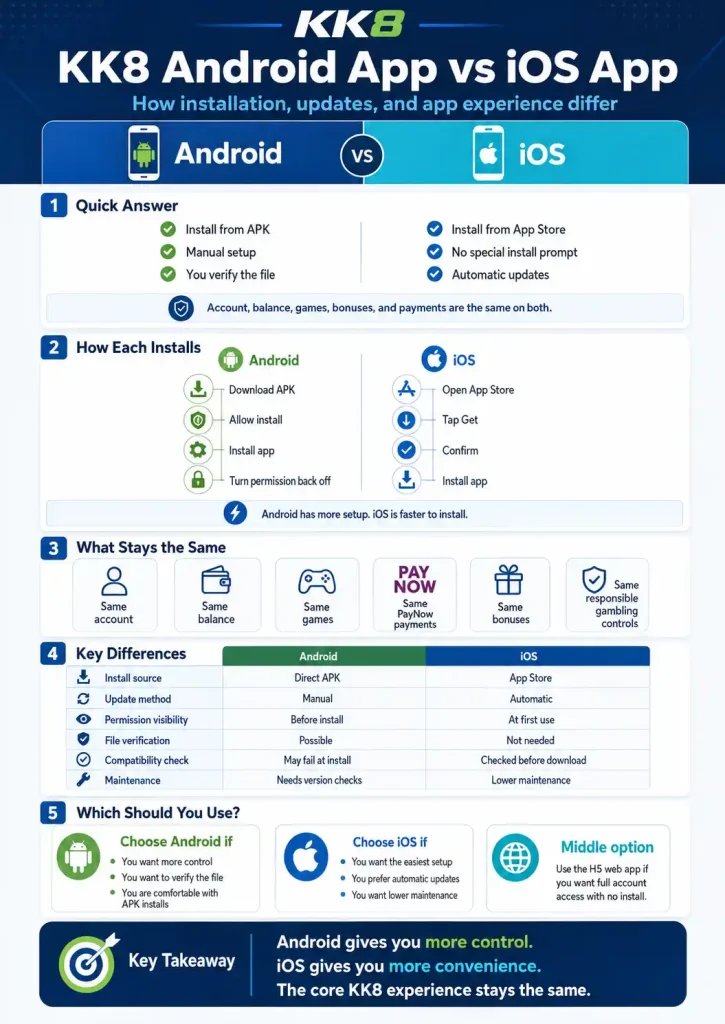
In the KK8 app Android vs iOS comparison, the account, balance, games and payment methods are identical. What differs is everything around the app rather than inside it.
Android installs from an APK file downloaded directly from kk8sg.com, requires you to approve the installation manually, and does not update itself. iOS installs from the App Store like any other app, needs no special permission, and updates automatically.
The trade is controlled against convenience. Android shows you the permission list before installing and lets you verify the file’s signature, which is real visibility. iOS hands that checking to Apple, which is a real convenience. Neither is safer in the abstract. They distribute the responsibility differently.
Feature parity is close but not exact, and the specifics are set out below.
KK8 App Android vs iOS: How Each Installs
This is the largest difference by a wide margin, and it is where nearly all the friction lives.
On Android, you download an APK file from the official site. Your browser warns you about the file type. Android blocks the install and asks you to grant permission to install from that source. You grant it, install, then switch the permission back off. The full sequence is in the Android installation guide.
Four steps that feel alarming the first time and take about two minutes. The reason for them is that the app is not in the Google Play Store, which restricts real money gambling apps by country and licence. That policy is explained in the guide on why the app is not on Google Play.
On iOS, you open the App Store, tap Get, confirm with Face ID, and wait. No warnings, no permission dialogue, no file to verify. The iPhone installation guide covers it, though there is not much to cover.
One consequence worth stating: an incompatible iPhone simply will not offer the download, because the App Store checks compatibility first. On Android, an incompatible phone will let you download the file and then fail at install, usually with an unhelpful parsing error rather than a message about your OS version.
KK8 App Android vs iOS: What Is Identical
Most of it, which is worth saying before the differences.
One account and one balance across both, plus the website. Sign in on either platform with the same credentials. The same game catalogue, the same odds, the same live tables and dealers. The same PayNow deposits and withdrawals with the same processing times and limits.
The same bonuses and terms, the same verification status once documents are approved, and the same responsible gambling controls, which apply at account level rather than per device.
Switching phones does not affect any of this. Nothing is stored locally that matters, so moving from an Android to an iPhone means installing the app and signing in.
KK8 App Android vs iOS: Feature Differences
This is the section the current live page handles badly, and the one readers actually came for.
|
Feature |
Android |
iOS |
|---|---|---|
|
Biometric login |
Fingerprint and face unlock |
[CONFIRM: Face ID and Touch ID] |
|
Push notifications |
Yes |
[CONFIRM: Yes, with system-level opt-in] |
|
App-only game titles |
[XX] |
[CONFIRM: same count or fewer] |
|
In-app document upload |
Camera |
[CONFIRM: camera] |
|
Permission visibility before install |
Yes, in the manifest |
No, requested at first use |
|
File verification possible |
Yes, signature check |
Not applicable |
|
Tablet support |
[CONFIRM] |
[CONFIRM: iPad or iPhone-only layout] |
|
Widgets or shortcuts |
[CONFIRM] |
[CONFIRM] |
[EDITOR: replace every CONFIRM with a real answer. If a feature exists on Android and not on iOS, say so plainly. Readers on the missing side will find out regardless, and discovering it themselves after installing costs more trust than reading it here.]
The two rows that are certain are the last two on visibility. On Android you can read the full permission list before installing, and you can verify the file’s signature against the published fingerprint. Both are covered in the permissions guide. On iOS neither is possible, because Apple performs that checking during its own review process instead.
KK8 App Android vs iOS: Updates and Maintenance
The difference here is bigger than it sounds and causes more problems than any other.
iOS updates itself. The App Store pushes new versions, and unless you have disabled automatic updates you will generally be current without doing anything.
Android does not. Nothing tells you a new version exists. You keep running whatever you installed until you go and check, which most people never do.
This single difference explains a large share of the problems that get reported as bugs. Sessions expiring immediately, games failing to load, payment screens erroring out: in most cases the app is simply several versions behind. On Android, checking your version periodically is part of using the app rather than optional housekeeping.
There is a security dimension too. Security fixes reach iOS users automatically and reach Android users only when they act. That is a real argument for the iOS version where someone genuinely has the choice.
KK8 App Android vs iOS: Which Should You Get?
For most people the honest answer is: whichever matches the phone in your pocket. Neither version is good enough to justify buying a different device, and both connect to the same platform.
If you do hold both, a few situations point one way or the other.
Use iOS if you would rather not think about updates or verification, if you are uncomfortable sideloading, or if the device is shared and you want Apple’s review process doing the checking.
Use Android if you want to see the permission list before installing and verify the file yourself, or if [CONFIRM any Android-exclusive features here].
Use neither if your device does not meet the minimum specs in the system requirements guide. The H5 web app runs in any modern browser, needs no install on either platform, and gives full account access.
Switching Between Platforms
Moving from Android to iPhone or the reverse is uneventful, because nothing important lives on the device.
Install the app on the new phone and sign in. Balance, bet history, verification status and bonus eligibility are all held server side. You may need to set up biometric login again, since that is bound to the device rather than the account.
One thing to do rather than skip: uninstall the app from the old phone, especially if you are selling or passing it on. The app keeps sessions alive between uses, so a signed-in copy on a device you no longer control is worth removing deliberately. What the file leaves behind is covered in the guide to what an APK contains.
Frequently Asked Questions
Is the KK8 iOS app better than the Android one?
Easier to install and maintain, yes. Functionally they are close to identical, and the account behind them is the same. The iOS advantage is process rather than product.
Why do I have to install an APK on Android but not on iPhone?
Google Play restricts real money gambling apps by country and licence, so the Android version is distributed directly. Apple applies different rules, which is why the App Store route is available.
Do I get the same games on both?
The main catalogue is identical. [CONFIRM whether the app-only titles are present on both platforms or Android only.]
Can I use one account on an iPhone and an Android phone at once?
Yes. The same account works across devices and platforms, with the balance shared.
Which version is safer?
They distribute responsibility differently rather than one being safer. iOS relies on Apple’s review. Android gives you the tools to check the file yourself, which works well if you use them and not at all if you do not.
What if my phone is too old for either version?
Use the H5 web app in your browser. It works on both platforms with no installation, and current requirements are always listed on the download page.
Responsible Gaming
You must be 21 or older to hold a KK8 account. Deposit and time limits, plus self exclusion, are available under Profile then Responsible Gambling. If gambling is causing difficulty for you or someone close to you, the National Council on Problem Gambling in Singapore operates a helpline on 1800-6-668-668.