The H5 web app vs native app distinction confuses people because both end up as an icon on your home screen and both open full screen. From the outside they look the same. What differs is what is actually sitting behind that icon.
A native app is software installed on your phone. An H5 web app is a shortcut to a website that has been built to behave like an app. That difference determines how much storage you give up, whether you have to think about updates, what the app can do when your phone is locked, and whether you have to download anything at all.
This guide covers both honestly, including the situations where the web version is the better answer. All three access routes to KK8 are on the KK8 App Download page.
Quick Answer
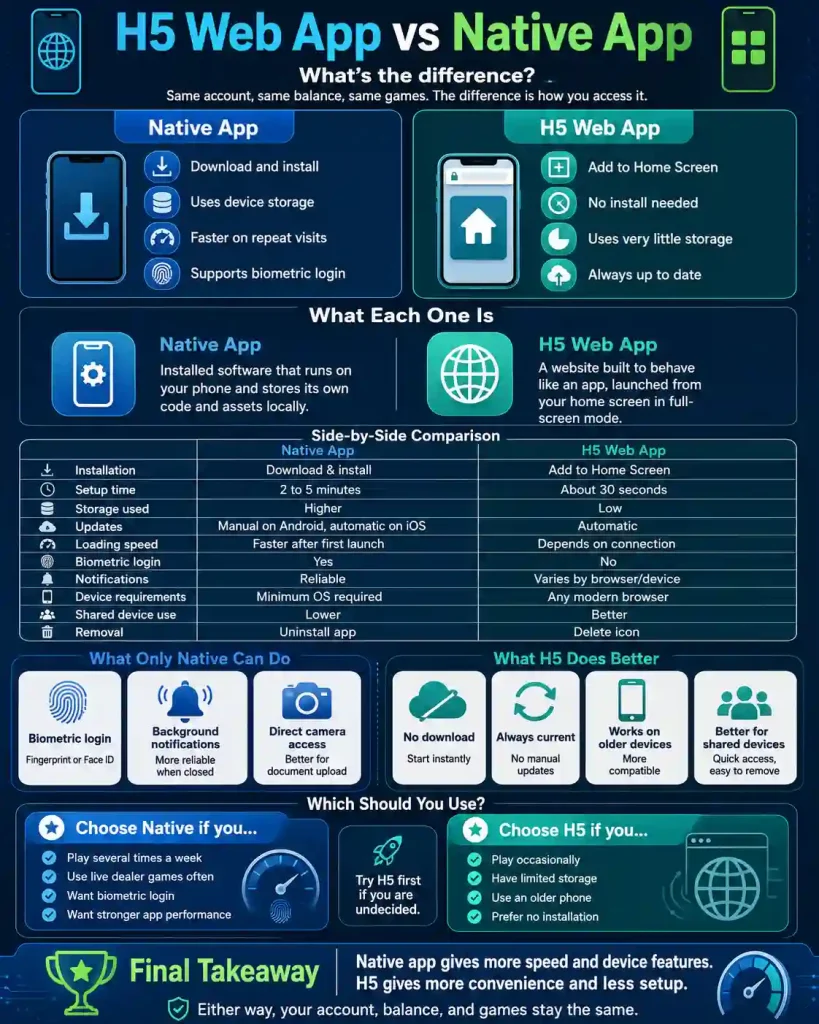
In the H5 web app vs native app comparison, a native app is downloaded and installed, occupies storage, and runs its own code on your device. An H5 web app is a website added to your home screen, which opens full screen without the browser address bar and needs no installation at all.
H5 stands for HTML5, the web technology it is built on. In Western markets the same idea is usually called a progressive web app. The terms describe roughly the same thing.
The native app is faster on repeat visits, supports biometric login, and can send notifications when closed. The H5 version needs no download, uses almost no storage, updates itself, and works on devices that cannot meet the native app’s requirements. Account, balance and games are identical either way.
H5 Web App vs Native App: What Each One Is
An H5 web app is a mobile website, presented so it behaves like an app. You open the site in your browser, use Add to Home Screen, and an icon appears. Tapping it launches the site in standalone mode, with no address bar and no browser chrome.
Nothing is installed. There is no file, no permission prompt and no security warning, because you have not added software to your phone. You have added a shortcut with instructions about how to display the site. The setup takes about thirty seconds and is covered in the home screen setup guide.
A native app is a compiled application installed on your device. It holds its own code and assets locally, can use device hardware directly, and continues to exist whether or not a browser is open. On Android it arrives as an APK, on iOS through the App Store, and the two routes differ substantially, which the Android versus iOS comparison covers.
Both connect to the same servers. The games, odds, balance and account are not different products behind the two icons.
H5 Web App vs Native App: Side by Side
|
Native app |
H5 web app |
|
|---|---|---|
|
Installation |
Download and install |
Add to home screen |
|
Setup time |
2 to 5 minutes |
About 30 seconds |
|
Storage used |
[XXX] MB, growing with cache |
A few MB of browser cache |
|
Security warnings |
Yes on Android APK |
None |
|
Updates |
Manual on Android, automatic on iOS |
Automatic, always current |
|
Loading speed |
Faster after first launch |
Depends on connection |
|
Biometric login |
Yes |
No |
|
Push notifications |
Yes |
[CONFIRM: possible on iOS 16.4+ and modern Android, if implemented] |
|
Works offline |
Menus only, no gameplay |
No |
|
Device requirements |
Minimum OS version applies |
Any modern browser |
|
Shared device suitability |
Lower, sessions persist |
Higher |
|
Removal |
Uninstall through settings |
Delete the icon |
H5 Web App vs Native App: Speed and Performance
The native app wins here, though by less than the marketing usually suggests.
A native app stores its interface, images and layouts on your device, so opening it does not require fetching those again. An H5 app relies on the browser cache, which helps but is less durable and gets cleared more often.
The gap is most visible on live dealer games, which stream video continuously. A native app can devote bandwidth to the stream because everything around it is already local. It is least visible on menus and slots over a good connection, where many people would struggle to tell them apart in a blind test.
Hardware matters more than the app type. A recent phone on good Wi-Fi runs the H5 version comfortably. An older phone on mobile data will feel the difference. Minimum specifications for the native version are in the system requirements guide, and a device sitting at those minimums may actually perform better on H5 than on a native app it can barely run.
H5 Web App vs Native App: What Only Native Can Do
Three things, and the list is shorter than it was a few years ago.
Biometric login. Signing in with fingerprint or Face ID requires access to the device’s secure hardware, which a web app does not get. On H5 you type a password every time. Setup for the native version is in the biometric login guide.
Reliable background notifications. This one is changing. Web push has been supported on Android browsers for years and arrived for home-screen web apps on iOS 16.4. So the capability exists, but whether it is implemented and how reliably it delivers varies. [CONFIRM whether the KK8 H5 version implements web push, and on which platforms. If it does not, say so plainly rather than leaving the impression it might.]
Direct camera integration. Native apps can open the camera with framing guidance for document verification. H5 falls back to a standard file upload, which works but produces more rejected documents. A fuller feature list is in the app features overview.
Notably absent from this list: games, odds, payments, bonuses and account management. All of those work identically.
What the H5 Web App Does Better
Four genuine advantages, not consolation prizes.
Nothing to install. No file, no APK, no permission prompt, no security warning, no decision about whether to trust a download. For anyone hesitant about sideloading, this removes the question entirely rather than answering it. The reasons that question exists at all are covered in the APK download safety guide.
Always current. Because it is the website, you are always on the latest version. The Android native app does not update itself, and running an outdated build is the most common cause of problems that get reported as bugs, which is why checking your version is a real chore on native and a non-issue on H5.
Works on any device. No minimum OS version beyond what your browser needs. Older phones that cannot install the native app run H5 without complaint.
Better on shared devices. Sessions behave like browser sessions rather than persisting indefinitely, and removing it means deleting an icon rather than uninstalling an app.
H5 Web App vs Native App: Which Should You Use?
-
Native if you play several times a week, live dealer games are your main interest, you want biometric login, or your phone comfortably exceeds the minimum specs.
H5 if you play occasionally, storage is tight, your phone is older, you share the device, or you would rather not install anything. You lose biometric login and possibly notifications, and keep everything else.
Try H5 first if you are undecided. It takes thirty seconds and commits you to nothing. If it feels slow or you find yourself wanting notifications, install the native version then. Starting with the download and discovering you did not need it is the more expensive order to do this in.
For the KK8-specific version of this decision, including how both compare against simply using the site in a browser tab, see the app versus website comparison.
Frequently Asked Questions
What does H5 mean?
HTML5, the web standard the app is built on. The term is common in Asian markets. Elsewhere the same concept is usually called a progressive web app.
Is an H5 web app safe?
There is nothing to install, so the install-related risks do not apply. You are using a website, with the same security as visiting it in a browser.
Does the H5 version have fewer games?
No. The catalogue is the same. What differs is device-level features such as biometric login, not content.
Can I use both?
Yes. One account across the native app, the H5 version and the browser, with the balance shared. Many people install the native app and keep H5 on a second device.
Will the H5 app work without the internet?
No, and neither will the native app for anything beyond cached menus. Games run on servers, so a connection is required either way.
How do I remove an H5 web app?
Press and hold the icon and delete it, the same as any shortcut. Nothing remains beyond ordinary browser cache. If you decide you want the installed version instead, both are reached from the download page.
Responsible Gaming
You must be 21 or older to hold a KK8 account. Deposit and time limits, plus self exclusion, are available under Profile then Responsible Gambling. If gambling is causing difficulty for you or someone close to you, the National Council on Problem Gambling in Singapore operates a helpline on 1800-6-668-668.