Category: PayNow Casino Singapore

  • The Growth of Cashless Payments Among Singapore Players

    The Growth of Cashless Payments Among Singapore Players

    Singapore’s shift toward cashless payments did not start with online gaming. It grew through everyday activities such as paying merchants, transferring money to friends, shopping online and managing bills from mobile banking apps.

    Systems such as FAST, PayNow and SGQR reduced many of the steps once associated with electronic transfers. Instead of entering full bank details, users now complete many payments through a mobile number, an identifier or a QR code.

    PayNow, launched for participating banks on 10 July 2017, lets users transfer Singapore dollars through FAST without knowing the recipient’s bank account number. The service operates around the clock.

    These experiences have also influenced what Singapore players expect from payment systems. Speed matters, but the bigger change involves fewer steps, easier mobile access and clearer transaction status.

    Explore More: PayNow Casino Singapore

    Quick Answer

    Cashless payments have become more relevant to Singapore players because they match payment habits already established outside gaming. Mobile banking, PayNow and QR payments make it easier to initiate transfers, confirm recipient details and check transaction records without handling cash or manually entering long account numbers.

    The important distinction is between payment-network speed and platform-processing speed. A bank transfer might complete almost instantly while the receiving platform still needs to identify, verify and credit the transaction. Understanding both stages gives players a more accurate view of what a “fast payment” means.
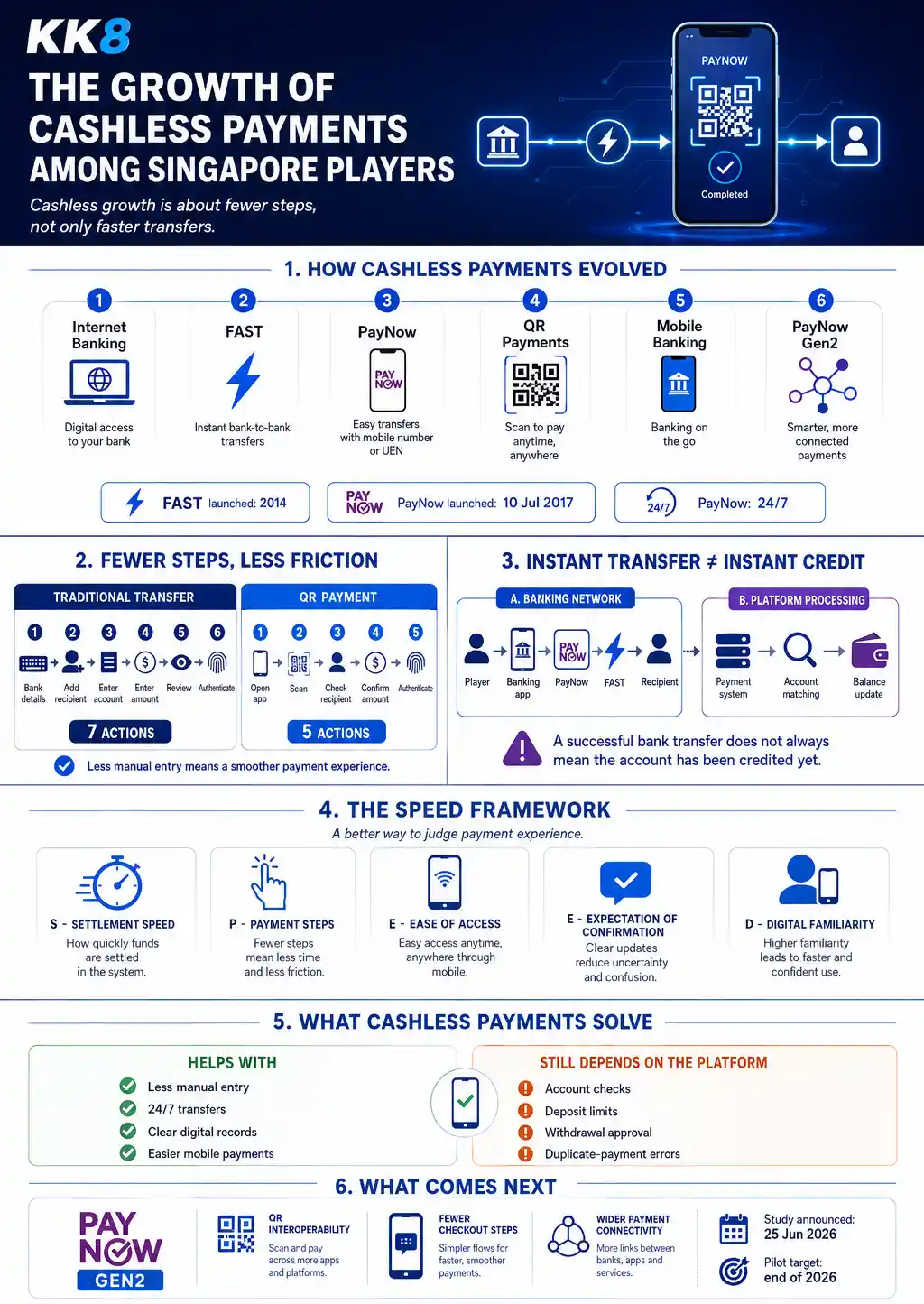
    The growth of cashless payments among Singapore players, including FAST, PayNow, QR payments, payment steps, transaction processing, and PayNow Gen2

    How Singapore Moved Toward Cashless Payments

    Singapore’s cashless transition developed over several stages. Each stage reduced a different form of payment friction.

    Payment development What changed for users
    Internet banking Transfers moved from branches and ATMs to online banking
    FAST Singapore-dollar bank transfers became almost immediate
    PayNow Users no longer needed full account details for many transfers
    PayNow QR and SGQR Scanning replaced more manual payment entry
    Mobile banking Payments, records and authentication moved onto one device
    PayNow Gen2 Planned enhancements target fewer checkout steps and wider interoperability

    FAST, or Fast And Secure Transfers, launched in March 2014. It allows customers at participating financial institutions to transfer Singapore-dollar funds between accounts almost instantly. PayNow later built a simpler addressing layer on top of FAST.

    That distinction matters. FAST is the transfer infrastructure. PayNow provides a simpler way to identify who receives the money.

    PayNow Reduced the Need for Account Details

    Traditional transfers often require the recipient’s bank name and account number. PayNow changes the process. 

    Eligible users transfer funds through identifiers such as a mobile number, NRIC/FIN or Virtual Payment Address. Businesses also receive payments through PayNow Corporate using their UEN. For users, this reduces input rather than merely reducing processing time.

    Read more: How PayNow Transfers Work in Singapore

    QR Payments Reduced Payment Steps Further

    QR payments change the payment journey again. A simplified traditional transfer might involve:

    Find bank details → Add recipient → Enter account information → Enter amount → Review → Authenticate → Confirm

    A QR-based journey might look more like:

    Open banking app → Scan → Check recipient → Confirm amount → Authenticate

    The exact steps vary between banks and services, but the direction is clear. Payment design has shifted toward reducing manual entry. This helps explain why cashless payment growth should not be measured through transaction speed alone.

    Why Cashless Payments Appeal to Singapore Players

    Players experience the same payment friction as other online consumers. They need to choose a payment method, complete a transaction and confirm whether it succeeded.

    Several features make modern cashless systems more practical.

    Fewer Manual Steps

    Every extra field creates another opportunity for a typing error. QR payments and registered PayNow identifiers reduce the amount of information users need to enter manually.

    Fewer steps also make mobile transactions easier because users spend less time switching between pages or copying banking details.

    24/7 Payment Access

    PayNow is available 24 hours a day, 365 days a year. This has changed the meaning of a bank transfer for many Singapore users. A bank payment no longer automatically means waiting for a branch, banking day or manual processing window before the underlying transfer begins.

    Clearer Transaction Status

    Modern banking apps normally display transaction status after a transfer.

    This gives users a record showing:

    • Amount
    • Recipient
    • Date and time
    • Transaction reference
    • Transfer status

    These records help when a receiving platform does not update an account immediately.

    Mobile-First Payment Management

    The same phone often handles payment initiation, authentication, confirmation and transaction history. This consolidation matters because convenience comes from the full payment journey, not one technical feature.

    Payment Speed Is No Longer the Only Measure

    Articles comparing payment methods often focus on one question:

    Which method is fastest?

    A better question is:

    How much effort does the user need to complete and verify the payment?

    Consider two methods taking roughly the same amount of time.

    Method A requires eight manual actions.

    Method B requires four.

    Users often perceive Method B as the smoother payment experience even if the final settlement difference is small.

    This introduces a useful concept: payment friction.

    The SPEED Framework for Cashless Payments

    A payment experience can be assessed through five factors, which together help evaluate how smooth and efficient a transaction feels. These factors provide a structured way to compare different payment methods beyond just speed. 

    Factor What to examine
    Settlement Speed How quickly funds move through the payment network
    Payment Steps How many actions the user completes
    Ease of Access Whether the method works easily through familiar devices and apps
    Expectation of Confirmation How clearly the transaction status appears
    Digital Familiarity How familiar users already are with the payment method

    This SPEED framework is an editorial model for comparing user experience. It is not an official banking-industry measurement. Its value lies in looking beyond a simple “instant versus slow” comparison.

    A payment method might settle quickly but still create friction through complicated forms, unclear instructions or additional manual verification.

    Read more: What Makes Fast Casino Payments Important Today?

    Instant Transfer Does Not Always Mean Instant Account Credit
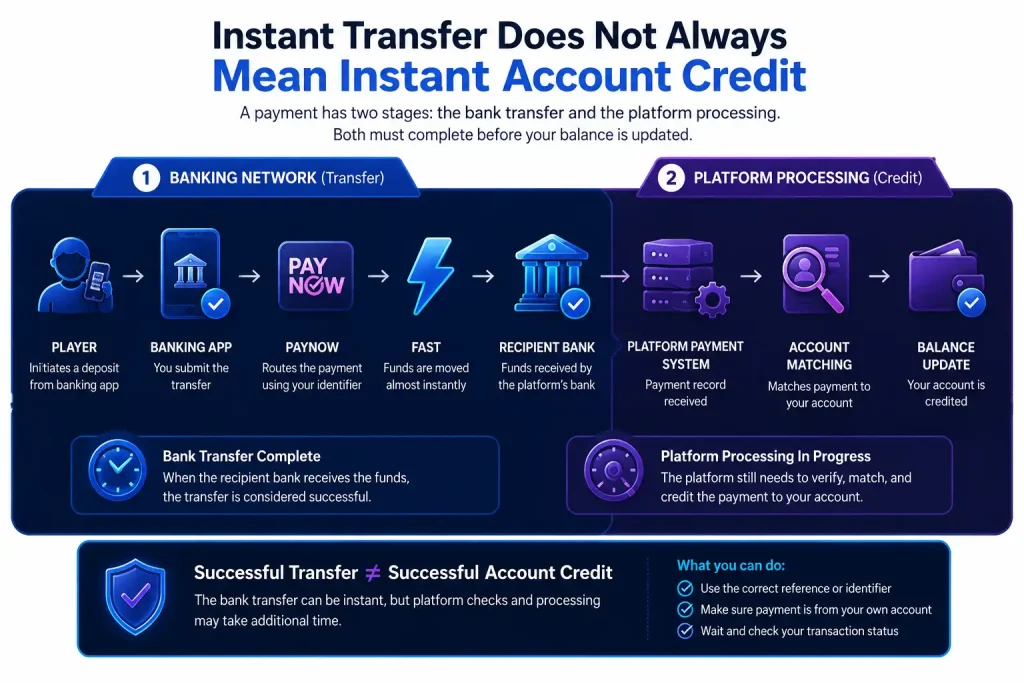
    This is one of the most important distinctions for players. A typical PayNow-related deposit journey looks like this:

    Player → Banking app → PayNow → FAST → Recipient → Platform payment system → Account matching → Balance update

    The bank transfer and the receiving platform are different parts of the process.

    A successful PayNow transfer means the banking stage reached the recipient. It does not automatically prove the receiving platform has completed its own processing.

    Singapore Pools provides a useful regulated local example. Its PayNow deposit guidance states a deposit might remain pending or be rejected due to an account-status check, deposit-limit issue, duplicate QR transaction or use of an unsupported third-party, joint or corporate account.

    This shows why users should avoid treating “money left my bank” and “my account has been credited” as the same event.

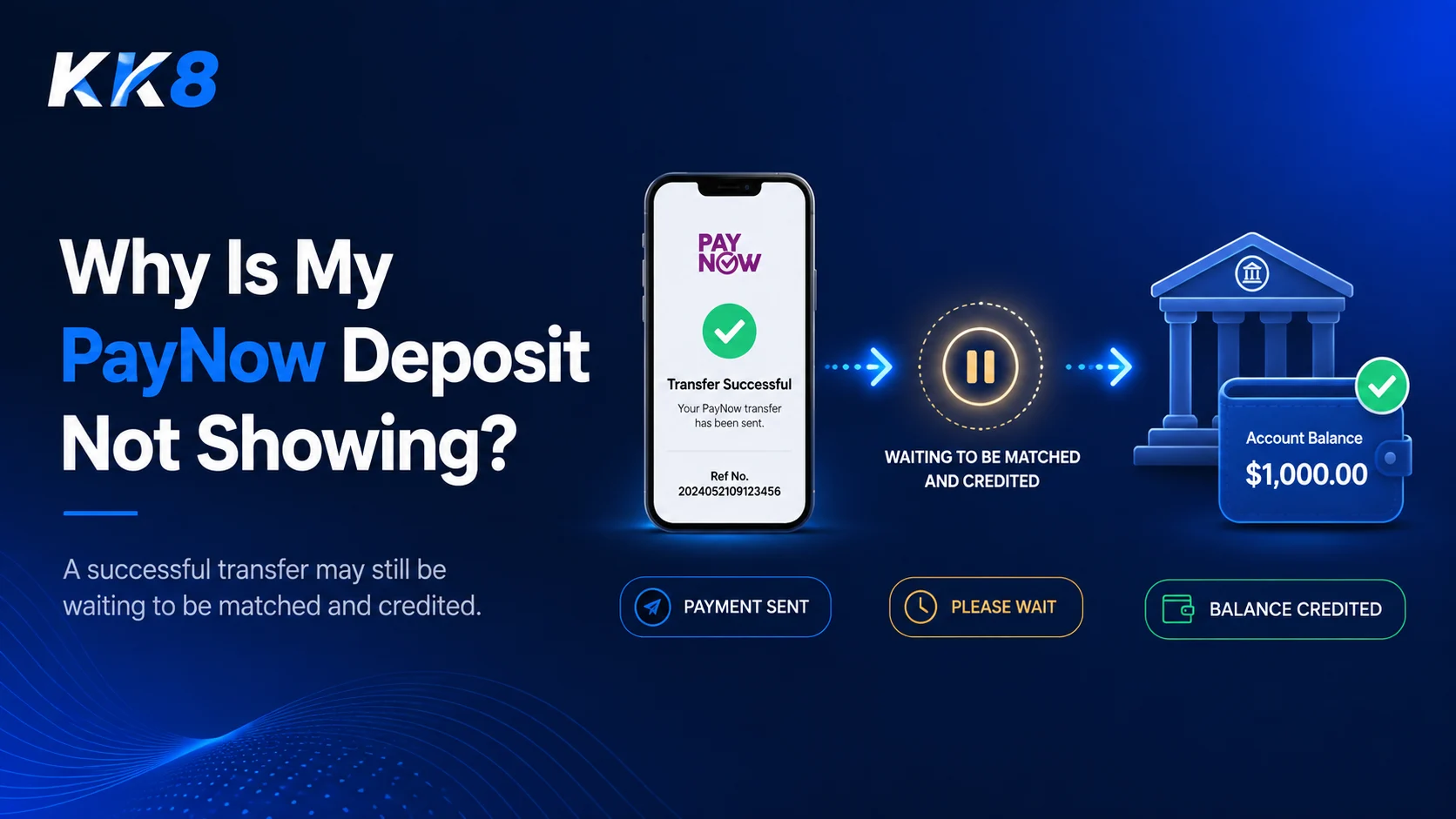
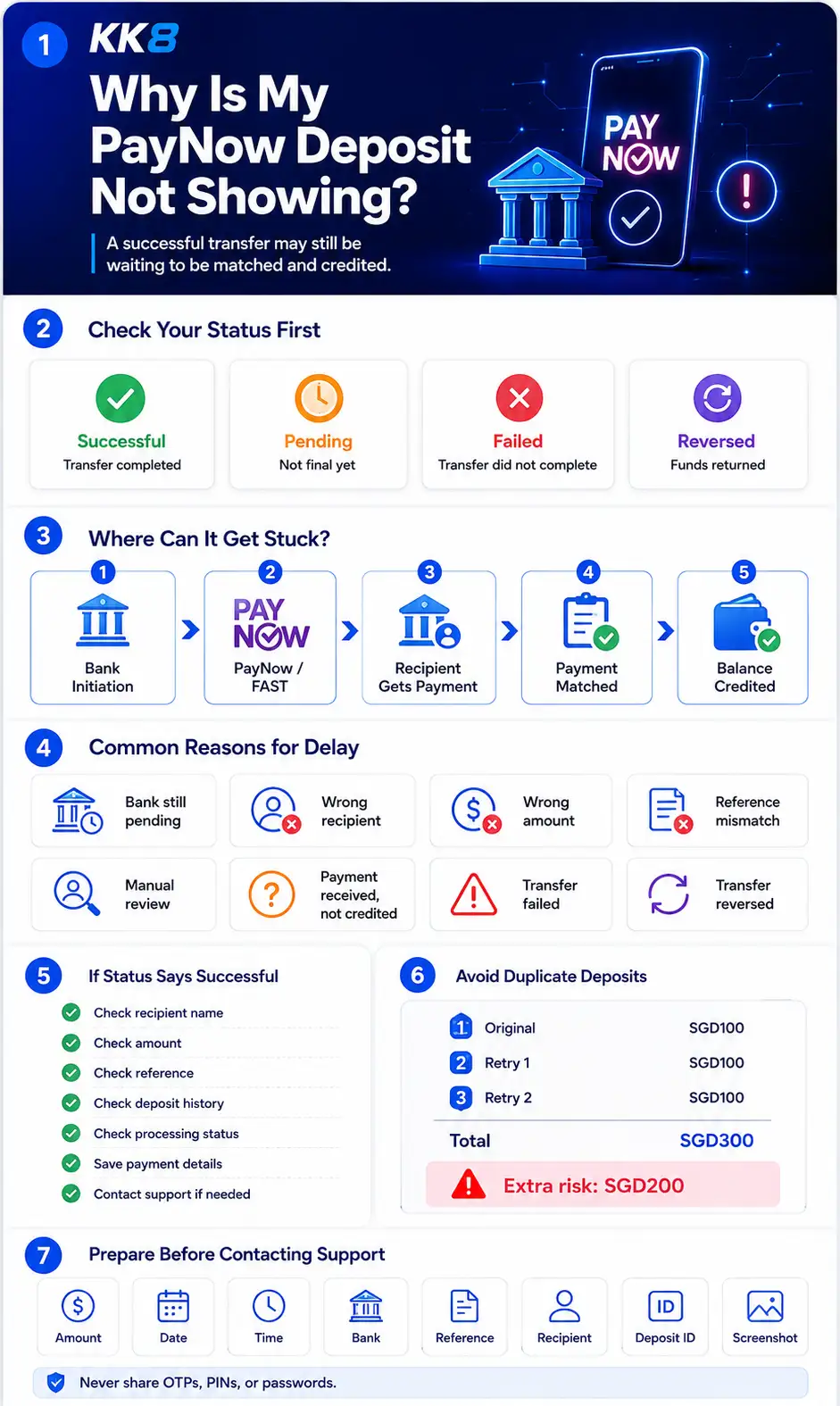
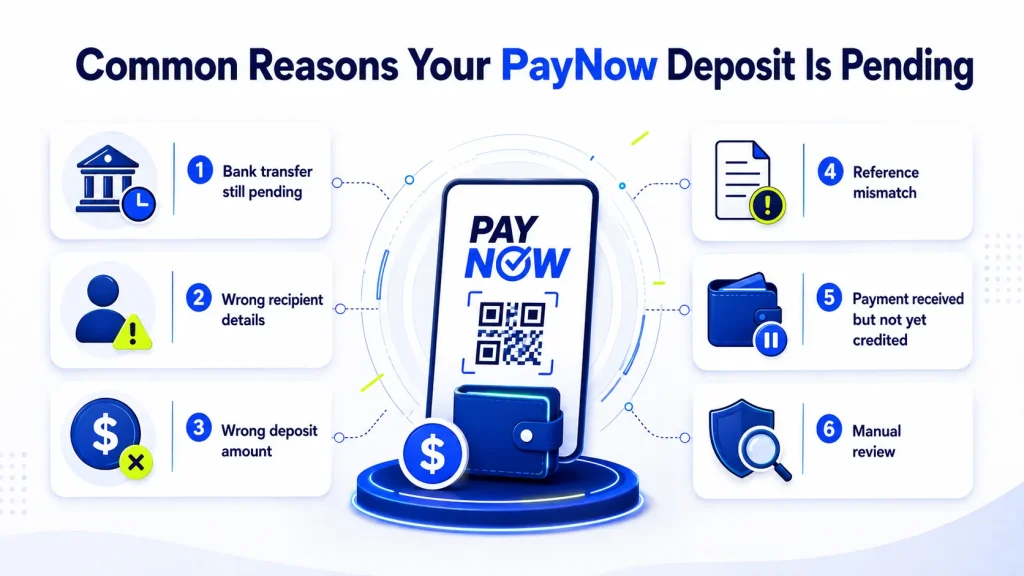
    Read more: Why Is My PayNow Deposit Not Showing?

    How Cashless Payments Changed the Online Casino Deposit Experience

    Cashless systems have reduced several pain points associated with older transfer processes.

    Users increasingly expect:

    • Mobile payment initiation
    • Fewer manual fields
    • Recipient verification before confirmation
    • Immediate bank-side transaction status
    • 24/7 availability
    • Searchable digital transaction records

    Singapore Pools offers a local example of a QR-based deposit flow. Its official process involves generating a PayNow QR code, scanning it through a participating banking app and completing the transaction within the QR validity period.

    The important lesson is not the specific online gaming platform. It is how familiar consumer payment behaviour has entered account-funding journeys. 

    Related guides:

    How to Deposit Using PayNow at an Online Casino

    Instant PayNow Deposits vs Manual Transfers

    Cashless Payments Also Changed Withdrawal Expectations

    Deposit speed is only half of the payment experience. When users become familiar with near-real-time transfers, they start paying closer attention to how quickly money moves in the opposite direction.

    A withdrawal usually has more stages:

    Withdrawal request → Platform checks → Approval → Payment instruction → Banking network → Recipient account

    This explains why a platform supporting a fast payment rail might still have a slower withdrawal process. The delay might occur before the payment network receives the instruction.

    This distinction is important when comparing withdrawal claims. “PayNow withdrawal” describes the payment route, not necessarily the full processing time.

    Related guides:

    How to Withdraw Casino Winnings with PayNow

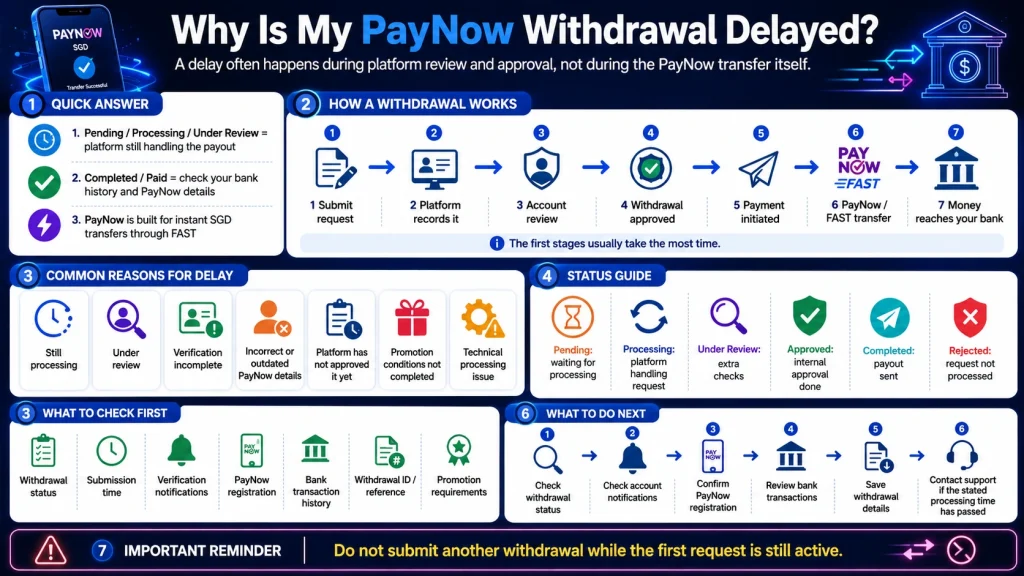
    Why Is My PayNow Withdrawal Delayed?

    What Cashless Payments Solve, and What They Do Not

    Cashless payments improve several parts of the transaction experience, but they do not remove every source of delay or error.

    Issue Does cashless payment help? Explanation
    Manual bank-account entry Yes QR codes and registered identifiers reduce manual input
    24/7 transfer initiation Yes PayNow operates around the clock
    Transaction records Yes Banking apps provide digital payment histories
    Wrong-recipient risk Not completely Users still need to verify recipient details
    Platform account checks No Receiving platforms set their own checks
    Deposit limits No Limits still apply
    Withdrawal approval No The platform normally handles approval before payout
    Account verification No Identity and account checks remain separate processes
    Duplicate payment errors No Users still need to follow the correct payment process

    The Association of Banks in Singapore advises users to check the recipient’s displayed name before confirming a PayNow transfer.

    What PayNow Gen2 Says About the Next Stage of Cashless Payments
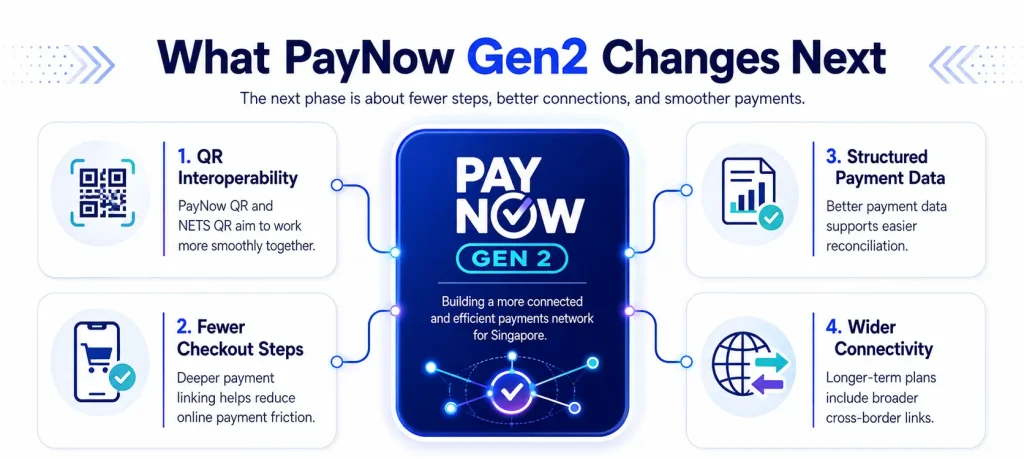
    PayNow Gen2 in Singapore, including QR interoperability, fewer checkout steps, structured payment data, and wider payment connectivity

    Singapore’s payment system continues to develop, with ongoing improvements to speed, interoperability and user experience across services like PayNow, FAST and QR-based payments.

    On 25 June 2026, the Monetary Authority of Singapore and the Association of Banks in Singapore announced a PayNow Generation 2 study focused on four areas of enhancement.

    One proposal involves interoperability between PayNow QR and NETS QR. This would let consumers scan and pay merchants across the two payment schemes more easily. A pilot is targeted for the end of 2026.

    Another area focuses on improving online checkout through deeper linking within PayNow QR flows. The stated goal includes reducing payment steps. Longer-term areas include request-to-pay functions, structured payment data for automated reconciliation and broader cross-border connectivity.

    These developments support a wider trend: the next phase of digital payments is not only about moving money faster. It is also about reducing friction around the transfer.

    Related guides:

    How Digital Payments Changed Online Gambling in Singapore

    A Better Way to Measure Cashless Payment Progress

    The growth of cashless payments should not be judged through transaction volume alone. For users, progress also appears through practical changes:

    • More manual entry → Less manual entry
    • Account numbers → Registered identifiers and QR codes
    • Banking-hour thinking → 24/7 transfers
    • Transfer completed → Clear digital status
    • Separate banking tasks → Mobile-first payment management
    • Long checkout journeys → Fewer payment steps

    For Singapore online casino players, these wider changes matter because payment expectations do not develop inside gaming platforms alone. They come from everyday experiences with banks, shops, online services and person-to-person transfers.

    A player accustomed to scanning a QR code and seeing a payment status within seconds is likely to notice unnecessary payment friction elsewhere. That is the larger story behind cashless payment growth.

    Frequently Asked Questions

    Why are cashless payments growing in Singapore?

    Cashless payments reduce the need for physical cash and manual banking information. Systems such as FAST, PayNow and QR payments also support mobile and round-the-clock transactions. PayNow itself operates 24/7 and sends funds through FAST.

    Is PayNow a cashless payment method?

    Yes. PayNow is an electronic funds-transfer service. It lets participating users send and receive Singapore dollars through FAST using registered identifiers rather than relying solely on bank account numbers.

    What is the difference between FAST and PayNow?

    FAST is Singapore’s electronic funds-transfer infrastructure for near-immediate Singapore-dollar transfers between participating institutions. PayNow runs through FAST and makes transfers easier by letting users identify recipients through registered proxies such as mobile numbers or NRIC/FIN.

    Does an instant PayNow transfer mean an instant deposit?

    Not always. The banking transfer and the receiving platform’s account-crediting process are separate stages. A recipient platform might still perform account matching, limit checks or other processing after funds arrive. Singapore Pools documents several cases where a PayNow deposit might remain pending or be rejected despite the payment process being initiated.

    What is PayNow Gen2?

    PayNow Gen2 is a 2026 MAS and ABS initiative examining improvements to Singapore’s instant-payment infrastructure. Areas under study include PayNow-NETS QR interoperability, fewer online checkout steps and longer-term improvements such as automated reconciliation and wider cross-border payment functions.

    Sources

    Association of Banks in Singapore, PayNow Singapore and PayNow Fact Sheet.

    Monetary Authority of Singapore and Association of Banks in Singapore, PayNow Generation 2 study, 25 June 2026.

    Singapore Pools, Singapore Pools Account Deposit Through PayNow Guide.

    Gambling Regulatory Authority of Singapore, Licences for Gambling Operators

  • What Makes Fast Casino Payments Important Today?

    What Makes Fast Casino Payments Important Today?

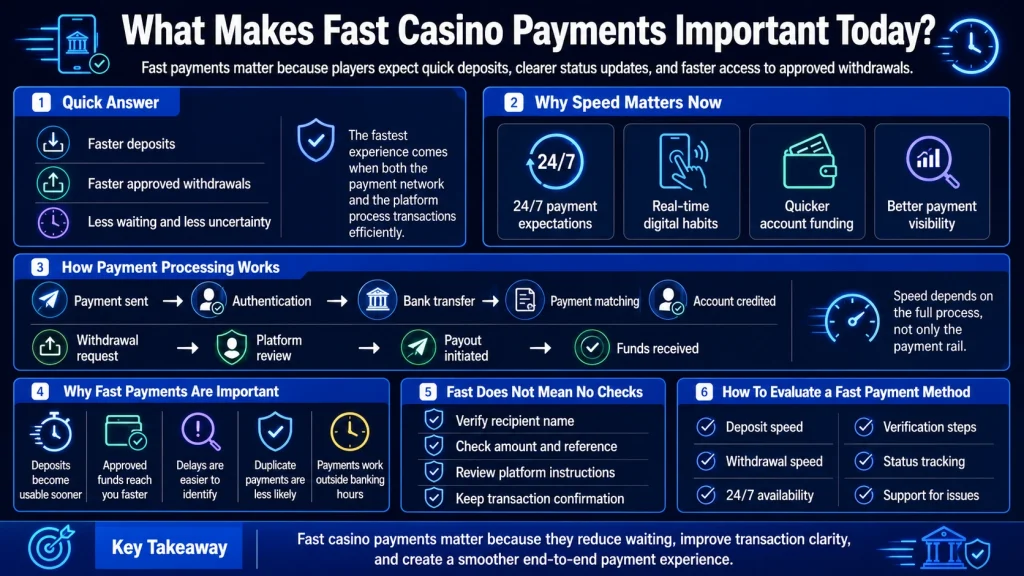
    Fast casino payments matter because players increasingly expect deposits and withdrawals to work with the same speed and convenience as other digital payments. In Singapore, services such as PayNow already let users send and receive SGD almost instantly through FAST, 24 hours a day and 365 days a year. This payment environment influences what users expect when they fund or withdraw from an online account.

    Speed, though, involves more than how quickly money moves between banks. A casino payment might pass through payment confirmation, account matching, platform processing, verification, withdrawal approval, and the banking network. Fast casino payments therefore depend on the entire transaction process, not only the payment rail.

    For an overview of using real-time bank payments for online gaming transactions, read our PayNow Casino Singapore guide.

    fast casino payments

    Quick Answer

    Fast casino payments reduce the time between sending money and seeing it credited, or between requesting a withdrawal and receiving the funds. They also make transaction status easier to understand because players spend less time wondering whether a payment is still processing.

    Real-time payment systems such as PayNow support almost immediate movement of funds between participating financial institutions. The Bank for International Settlements defines fast payment systems as infrastructure where payment messages and final funds become available in real time or near real time, typically on a 24/7 basis.

    For online casinos, this creates an important distinction. A bank transfer might happen almost instantly, but the casino still needs to process the deposit or approve a withdrawal. The fastest experience comes when both stages work efficiently.

    What Are Fast Casino Payments?

    Fast casino payments are deposit or withdrawal methods designed to reduce the waiting time associated with moving money between a player and an online gaming account.

    Examples include:

    • PayNow
    • Real-time bank transfers
    • Selected e-wallets
    • Instant payment networks
    • Some card deposit methods

    The definition of “fast” differs between deposits and withdrawals. A deposit might appear shortly after payment confirmation, while a withdrawal often requires additional platform processing before money is released.

    This means an instant casino payment should not automatically be interpreted as an instant withdrawal.

    Why Payment Speed Matters More Today

    Digital payment habits have changed what users expect from online transactions. Real-time payment systems let consumers and businesses transfer funds outside traditional banking hours, reducing delays associated with older batch-based payment processes.

    BIS research notes that fast payment systems increase payment efficiency by making funds available close to real time and supporting transfers across multiple banks and payment service providers.

    Singapore users already have access to this type of infrastructure through FAST and PayNow. PayNow allows retail customers of participating banks and major payment institutions to send SGD instantly using identifiers such as a mobile number, NRIC/FIN, or Virtual Payment Address instead of entering a full account number.

    For online gaming payments, this raises expectations around deposit confirmation and withdrawal speed.

    1. Fast Deposits Reduce Waiting Before Funds Are Available

    The most obvious advantage of fast online casino deposits is shorter waiting time between making a payment and having the funds available in an account.

    A typical deposit involves several stages:

    1. The player chooses a payment method.
    2. Payment information is provided.
    3. The player approves the payment.
    4. The banking or payment network sends the money.
    5. The platform identifies the transaction.
    6. The gaming account balance is updated.

    With PayNow, the bank-transfer stage is designed to happen almost instantly through FAST.

    The platform still needs to match the incoming transaction to the correct account. This explains why an instant bank transfer and an instant casino deposit are related but not identical.

    For a closer comparison, see Instant PayNow Deposits vs Manual Transfers.

    2. Fast Withdrawals Improve Access to Approved Funds

    Deposit speed gets attention because it determines how quickly a transaction begins. Withdrawal speed is often more important because it determines when approved funds reach the player’s account.

    A withdrawal normally includes two stages.

    Stage 1: Casino Processing

    The platform receives the withdrawal request and reviews it. This might include identity checks, account verification, transaction review, payment ownership checks, or withdrawal conditions.

    Stage 2: Payment Transfer

    After approval, the platform initiates the payout through the selected payment channel.

    Even when the banking rail works in real time, the first stage might still add waiting time. As a result, fast casino withdrawals depend heavily on the platform’s internal processing rather than only the technical speed of PayNow or FAST.

    For a full explanation of the process, read How to Withdraw Casino Winnings with PayNow.

    3. Faster Payments Make Transaction Problems Easier to Identify

    Long processing times create uncertainty. If a transfer normally takes hours or days, a player has less information about when a delay becomes unusual.

    Real-time payments narrow this window.

    For example, PayNow is designed to send and receive SGD instantly through FAST. If the banking app shows a transfer as successful but the casino balance is still unchanged, the issue is more likely to involve transaction matching or platform crediting rather than the initial bank transfer.

    Similarly, if a casino withdrawal remains marked Pending, the payment might not yet have entered the PayNow transfer stage.

    This makes transaction status important when troubleshooting.

    How Casino Payment Processing Time Works

    Casino payment processing time should be separated into individual stages rather than treated as one number.

    Payment Stage What Happens Possible Source of Delay
    Payment initiation Player starts transaction Incorrect details
    Authentication Bank confirms payment Failed authentication
    Bank transfer Funds move through payment network Network or bank issue
    Payment matching Platform identifies transaction Missing reference
    Account crediting Balance is updated Internal processing
    Withdrawal review Platform checks payout Verification
    Payout initiation Funds are released Processing queue
    Receiving bank Funds reach account Banking issue

    Understanding these stages helps explain why two platforms accepting the same payment method might still offer different processing speeds.

    The payment method controls only part of the process.

    4. Real-Time Payments Work Outside Traditional Banking Hours

    Older payment methods were often influenced by banking hours, weekends, or settlement cycles. Fast payment infrastructure changes this model.

    PayNow operates 24/7 and 365 days a year. FAST also supports almost instant SGD transfers between participating institutions.

    This is particularly relevant to online services because users do not operate only during normal banking hours.

    A payment method available on evenings and weekends offers a different experience from one requiring users to wait for the next business day.

    5. Payment Speed Helps Reduce Duplicate Transactions

    One practical problem with slow payments is duplicate deposits.

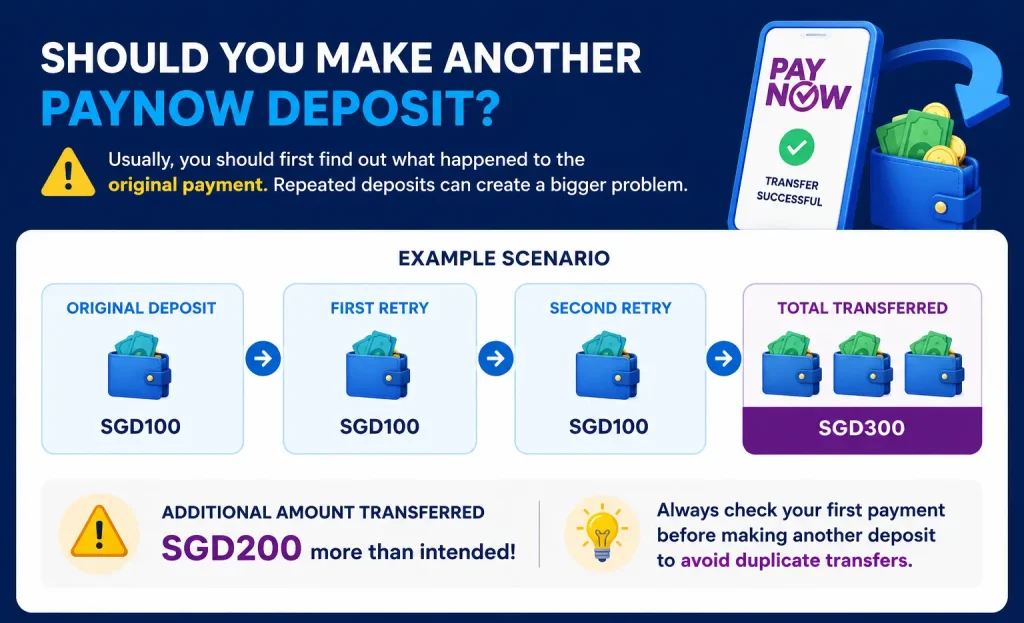
    Suppose a player sends SGD100 but does not see the amount reflected quickly. If the player assumes the payment failed and immediately sends another SGD100, the total transferred becomes SGD200.

    Fast transaction confirmation reduces this risk because users get clearer feedback sooner.

    The safer approach is still to check the banking transaction status before repeating a payment. A bank status of Successful means the banking stage completed, even if the receiving platform has not updated the balance yet.

    If you experience this issue, read Why Is My PayNow Deposit Not Showing? before making another transfer.

    6. Fast Payments Do Not Remove the Need for Security Checks

    Speed should not come at the expense of transaction verification.

    PayNow displays recipient information before a transfer is confirmed so the sender has an opportunity to verify the recipient. The service also avoids requiring a sender to know the recipient’s complete bank account number when using a registered PayNow identifier.

    Before confirming any payment, check:

    • Recipient name
    • Payment amount
    • Payment reference
    • Selected bank account
    • Platform payment instructions
    • Transaction confirmation

    Fast transfers mean mistakes might also move quickly. Recipient verification remains important even when the payment process takes only seconds.

    Are Instant Casino Payments Always Better?

    Not automatically.

    Payment speed is one factor when choosing a casino payment method. Other factors matter as well, including security, availability, withdrawal support, fees, transaction limits, verification requirements, and dispute procedures.

    A payment method offering a fast deposit but slow withdrawals might not provide the best overall payment experience.

    You should compare the complete transaction cycle:

    Deposit speed → Account crediting → Withdrawal approval → Payout speed

    This is more useful than comparing deposit time alone.

    For a broader comparison, read Which Payment Method Is Fastest for Singapore Players?

    Fast Casino Payment Methods Compared

    Payment Method Deposit Potential Withdrawal Support Main Consideration
    PayNow Real-time bank transfer Depends on platform Platform processing
    E-wallet Often fast Often supported Provider availability
    Bank transfer Depends on network Widely used Settlement method
    Credit card Often quick for deposits More variable Payout restrictions
    Manual transfer Depends on matching Depends on platform More manual processing

    The table describes general payment characteristics rather than guaranteed processing times. Actual speed depends on the financial institution, platform, account verification status, and transaction conditions.

    If you are comparing bank payments with cards, see PayNow vs Credit Card for Online Gambling.

    PayNow and Fast Casino Payments in Singapore

    PayNow is particularly relevant to discussions about fast casino payments because it operates on Singapore’s FAST infrastructure.

    PayNow lets eligible customers send SGD between participating banks and major payment institutions almost instantly. Users send funds using registered identifiers rather than needing the recipient’s traditional bank account details.

    FAST itself was launched in 2014 as an electronic funds transfer service that moves Singapore dollar funds between participating institutions almost instantly.

    The important distinction for players is this:

    PayNow transfer speed ≠ casino processing speed

    If PayNow completes a transfer in seconds but the platform takes several minutes to identify the deposit, the player’s total waiting time is determined by both systems.

    How to Evaluate a Fast Casino Payment Method

    Check Why It Matters
    Deposit processing time Shows how quickly funds become usable
    Withdrawal processing time Shows how quickly approved funds reach you
    24/7 availability Reduces reliance on banking hours
    Platform processing Affects total waiting time
    Payment status Helps identify delays
    Verification requirements Might affect withdrawals
    Fees Changes the total transaction cost
    Transaction limits Determines suitable payment size
    Security controls Helps protect payment details
    Support process Matters when a transaction fails

    A method that performs well across these areas is more useful than one offering fast deposits alone.

    Why PayNow Has Changed Payment Expectations

    PayNow is part of a wider shift toward retail fast payment systems. BIS research describes fast payment systems as infrastructure designed to make funds available in real time or near real time across participating financial institutions, while also improving efficiency in digital payments.

    For Singapore users, PayNow has made instant bank-to-bank transfers a normal part of everyday payments. The service has operated since July 2017 for participating banks and expanded to participating major payment institutions in February 2021.

    When users become accustomed to real-time domestic payments, long and unclear online payment processing becomes easier to notice.

    Our guide Why PayNow Has Become Popular for Online Casinos in Singapore looks more closely at this shift.

    What Will Make Casino Payments Faster in the Future?

    Future improvements are likely to focus on more than raw transfer speed. Real-time payment networks already move funds quickly, so the next gains are likely to come from better platform integration, automated payment matching, clearer transaction data, faster verification, and more efficient withdrawal processing.

    The key goal is reducing the time between each stage.

    For deposits:

    Payment sent → Payment identified → Account credited

    For withdrawals:

    Request submitted → Withdrawal approved → Payment sent → Funds received

    Reducing delays between these steps creates a faster end-to-end experience.

    For more detail on where payment technology is heading, read The Future of Real-Time Payment Methods for Online Casinos.

    Fast Casino Payment Checklist

    Before choosing or using a payment method, check:

    • How quickly deposits are normally processed.
    • How long withdrawals require.
    • Whether payments operate 24/7.
    • Whether the method supports both deposits and withdrawals.
    • Whether your account needs verification first.
    • Whether transaction fees apply.
    • Whether deposit or withdrawal limits exist.
    • Whether payment status is visible.
    • Whether the platform provides transaction references.
    • Whether support is available for delayed payments.

    Fast payment infrastructure is useful, but clear processing information is equally important.

    Frequently Asked Questions

    What are fast casino payments?

    Fast casino payments are deposit or withdrawal methods designed to reduce the time needed to move funds between a player, payment provider, bank, and gaming account. Real-time payment systems such as PayNow support almost immediate SGD bank transfers, though platform processing still affects total transaction time.

    Which casino payment method is fastest in Singapore?

    PayNow is one of the fastest underlying bank-transfer options because it uses FAST to send SGD almost instantly between participating institutions. E-wallets and some other payment methods also offer quick processing. The final deposit or withdrawal speed still depends on the platform.

    Are fast online casino deposits instant?

    A PayNow bank transfer might happen almost instantly, but the platform still needs to identify and credit the payment. A fast bank transfer therefore does not guarantee the casino balance updates at the same moment.

    Why do fast casino withdrawals take longer than deposits?

    Withdrawals often require platform approval before money is sent. Verification, transaction checks, payment ownership checks, and internal processing might occur before the payment reaches the banking network.

    Does PayNow work 24 hours a day?

    Yes. PayNow is available 24/7, 365 days a year for participating institutions, making it suitable for real-time SGD transfers outside traditional banking hours.

  • The Future of Real Time Payment Methods for Online Casinos

    The Future of Real Time Payment Methods for Online Casinos

    The future of casino payment methods is moving toward faster settlement, fewer payment steps, stronger verification, and better connections between domestic and cross-border payment networks. In Singapore, PayNow already provides instant SGD transfers through FAST, while newer initiatives are looking at how instant payments could become easier to use for online checkout and international transfers.

    For online gaming payments, the important change is not simply whether a transaction is labelled “instant.” The wider payment process includes selecting a method, confirming recipient information, authenticating the transaction, processing the payment, matching it to an account, and handling withdrawals. Future casino payments are therefore likely to focus on reducing friction across the entire process rather than only increasing transfer speed.

    This reflects a wider shift in how digital payments have changed online gambling in Singapore, with payment systems becoming faster, more connected, and easier to use across different stages of the player journey.

    For a broader explanation of PayNow payments used by Singapore players, read our PayNow Casino Singapore guide.

    future of casino payment methods

    Quick Answer

    The future of online casino payments is likely to centre on real-time bank transfers, integrated mobile checkout, QR interoperability, faster cross-border payments, better payment data, and stronger fraud controls. Singapore is already moving in this direction. PayNow supports instant transfers through FAST, while the PayNow Generation 2 study announced in June 2026 is examining upgrades such as improved QR interoperability, smoother online checkout, request-to-pay, structured payment data, micro-payment infrastructure, expanded cross-border connections, offline payment capabilities, and support for new automated commerce use cases.

    These developments do not mean every online gaming platform will adopt every feature. They show where Singapore’s broader instant-payment infrastructure is heading, and they provide useful signals for the next generation of casino payments.

    Why Real-Time Payments Matter for Online Casinos

    Payment speed affects both deposits and withdrawals, but speed alone does not determine the overall experience. A deposit might move through the banking network instantly while the receiving platform still needs to identify and credit it. A withdrawal might require platform review before any bank transfer begins.

    This distinction is already visible with PayNow. The Association of Banks in Singapore describes PayNow as an instant SGD transfer service operating through FAST, 24 hours a day and 365 days a year.

    Future casino payment technology will therefore need to address several stages together: payment initiation,How PayNow Transfers Work in Singapore? authentication, transaction matching, account crediting, payout approval, and status tracking.


    1. Real-Time Bank Payments Will Become More Integrated

    One of the clearest payment trends is deeper integration between merchants, apps, banks, and instant-payment networks.

    Today, a PayNow user might scan a QR code, switch to a banking app, verify the recipient, enter or confirm an amount, and approve the transfer. Future systems aim to reduce some of these steps.

    The PayNow Generation 2 study announced by MAS and the Association of Banks in Singapore includes work on deep-linking within PayNow QR codes for online checkout. The stated goal is to reduce the number of payment steps and create a smoother checkout process for online merchants.

    For digital casino payment methods, similar payment flows would mean fewer manual steps between selecting PayNow and completing a transaction.

    What This Could Mean for Players

    A more integrated payment journey might involve selecting PayNow on a payment page, moving directly into the relevant banking flow, reviewing the transaction, and returning to the platform after approval.

    This would reduce reliance on manually copying payment information or switching between several screens. It would also make correct recipient verification more important because faster checkout should not remove transaction checks.

    2. QR Payments Will Become More Interoperable

    QR codes are already part of Singapore’s payment system. PayNow QR is integrated with SGQR, allowing users to make payments through participating banking and payment apps.

    The next stage is broader interoperability.

    In June 2026, MAS and ABS said they were exploring improvements between QR PayNow and NETS QR so consumers could scan and pay merchants regardless of which of the two schemes a merchant uses. A pilot was targeted for the end of 2026.

    This matters for the future of casino payment methods because payment systems become easier to integrate when merchants and users rely on compatible standards rather than separate closed payment flows.


    3. Cross-Border Real-Time Payments Will Expand

    Singapore has already connected PayNow with instant-payment systems in other countries. Current linkages include PromptPay in Thailand, UPI in India, and DuitNow in Malaysia. These systems support fast or near-real-time cross-border transfers through participating financial institutions.

    The wider direction is moving beyond individual country-to-country connections.

    Project Nexus was developed by the BIS Innovation Hub to connect domestic instant-payment systems through a standardised multilateral model. BIS says participating countries incorporated Nexus Global Payments in 2025 to move the project toward live implementation. The model aims to allow participating payment systems to connect once and reach other systems within the network.

    Why Cross-Border Connectivity Matters

    Many online platforms operate across several markets. A payment system that connects domestic instant-payment networks more efficiently could reduce reliance on slower international transfer processes.

    This does not mean Singapore users will automatically gain access to every overseas payment recipient. Financial institutions, platform policies, regulatory rules, supported corridors, currency conversion, and transaction screening will still affect availability.

    The broader direction is clear: next generation casino payments will increasingly operate within payment networks designed for faster cross-border connectivity.

    4. Payment Data Will Become More Useful

    Payment speed solves only part of the problem. Businesses also need to know who sent the payment, what transaction it relates to, and how it should be recorded.

    The PayNow Generation 2 study lists structured data fields for automated reconciliation among the longer-term capabilities being explored.

    This is particularly relevant to online payments. A platform might receive money instantly but still experience a delay if it cannot match the transfer to the correct user or order.

    Better transaction data could improve this process.

    Current Payment Challenge Future Payment Direction Possible Benefit
    Manual payment matching Structured payment data Faster account reconciliation
    Several checkout steps Deep-linked payment flows Simpler payment process
    Separate QR schemes Greater QR interoperability Wider payment compatibility
    Slow international transfers Connected instant-payment networks Faster cross-border processing
    Limited payment status information Richer transaction messaging Clearer payment tracking
    Manual payment requests Request-to-pay More structured payment initiation


    5. Request-to-Pay Could Change How Payments Start

    Traditional payments usually begin with the customer manually entering or selecting payment information.

    Request-to-pay changes the process. Instead of asking the customer to manually create the transaction, a merchant or service sends a structured payment request that the customer reviews and approves.

    Request-to-pay is among the longer-term capabilities included in the PayNow Generation 2 study.

    For future casino payments, a similar model could reduce errors associated with entering amounts, references, or recipient information manually. The customer would still need to review and approve the request through the relevant payment service.

    6. Micro-Payments Could Receive More Attention

    MAS and ABS are also examining a micro-payments rail as part of longer-term PayNow development.

    Micro-payment infrastructure is designed to process low-value transactions efficiently. While this work is not specific to online casinos, it shows how payment infrastructure is becoming more specialised for different transaction types.

    For online platforms more broadly, efficient low-value processing might create new payment models where traditional card costs or processing structures are less suitable.

    7. Security Will Develop Alongside Payment Speed

    Faster payments create a simple challenge: users have less room to correct mistakes after confirming a transaction.

    PayNow already includes recipient verification before payment confirmation. ABS states that the sender sees the recipient’s display name before completing the transfer, helping the sender verify where the money is going.

    Future payment systems will need to balance speed with authentication, recipient verification, fraud controls, transaction monitoring, and dispute handling. The PayNow Generation 2 study also identifies fraud prevention and dispute resolution among areas for further development.

    For players, this means faster payments should not replace basic transaction checks.

    Before making a payment, read How to Keep Your PayNow Casino Transactions Secure.

    8. Instant Withdrawals Will Depend on More Than Payment Rails

    Real-time bank infrastructure does not automatically create instant casino withdrawals.

    A withdrawal normally has two broad stages. The platform reviews and approves the payout first. The payment provider or banking network processes the transfer second.

    Even if the second stage becomes faster, identity verification, account checks, promotion conditions, transaction reviews, or manual payout approval might still delay the first stage.

    This is why the future of casino payment methods should be measured by end-to-end payout time rather than only the technical speed of the payment network.

    For current troubleshooting, read Why Is My PayNow Withdrawal Delayed?

    Will PayNow Remain Important for Singapore Players?

    PayNow is already built into Singapore’s domestic payment infrastructure. It supports participating banks and major payment institutions, operates through FAST, supports QR payments, and connects with several overseas instant-payment systems.

    Current PayNow Generation 2 work also indicates that Singapore intends to continue developing its instant-payment infrastructure rather than replacing it with an entirely separate model. MAS and ABS are studying changes across customer experience, business payments, network coverage, and payment-system capabilities.

    For this reason, PayNow and related real-time bank payment infrastructure are likely to remain relevant when discussing the future of online casino payments for Singapore users.

    What About E-Wallets, Cards and Other Payment Methods?

    Real-time bank payments are only one part of future casino payments. E-wallets, cards, bank transfers, and other regulated payment services will continue serving different needs.

    Cards offer established international acceptance. E-wallets provide an additional payment account between the user and merchant. Real-time bank payments reduce the need to enter full card or bank account details for individual transfers. Cross-border instant-payment networks aim to improve international transfers.

    The future is therefore less likely to involve one payment method replacing every other method. Different payment systems will compete on speed, cost, checkout convenience, security, availability, and withdrawal support.

    For a direct comparison, see PayNow vs E-Wallet for Casino Deposits.

    What Will Define the Next Generation of Casino Payments?

    Five factors are likely to matter most when evaluating future casino payment technology.

    Faster End-to-End Processing

    Players will increasingly judge payment methods by how long the full deposit or withdrawal takes, not just the underlying bank transfer.

    Fewer Checkout Steps

    Deep links, QR codes, and integrated payment approval could reduce manual actions between selecting a payment method and completing the transaction. Singapore’s PayNow Generation 2 work already identifies this as a priority area.

    Better Payment Matching

    Structured transaction information could help merchants identify and reconcile payments with fewer manual checks.

    Wider Cross-Border Connectivity

    Projects such as Nexus show how domestic instant-payment systems are moving toward multilateral connections rather than relying only on separate bilateral links.

    Stronger Transaction Controls

    Recipient verification, fraud prevention, authentication, transaction monitoring, and dispute processes will stay important as transfers become faster.

    Future Casino Payment Methods Checklist

    When comparing new payment methods in the future, do not judge them only by claims such as “instant” or “fast.”

    What to Check Why It Matters
    Deposit processing Shows how quickly funds reach the account
    Withdrawal processing Measures practical payout speed
    Bank or wallet support Determines availability
    Transaction verification Helps prevent incorrect transfers
    Fees Affects the real cost of using the method
    Cross-border support Matters for international transactions
    Payment status tracking Helps identify delays
    Security controls Protects account and payment information
    Refund or dispute process Matters when a transaction goes wrong

    Frequently Asked Questions

    What is the future of casino payment methods?

    The main direction is toward faster bank transfers, more integrated checkout, improved QR interoperability, richer payment information, better cross-border connectivity, and stronger security controls. Singapore’s PayNow Generation 2 work provides current examples of several of these developments.

    Will casino payments become completely instant?

    The banking transfer itself might take place in seconds, but casino deposits and withdrawals involve additional platform processing. Account verification, transaction matching, withdrawal approval, and security reviews can still add time.

    Will PayNow become faster in the future?

    PayNow already supports instant SGD transfers through FAST. Current development is therefore focused less on making the underlying domestic transfer simply “faster” and more on improving usability, interoperability, checkout, business payment functions, and network coverage.

    What is PayNow Generation 2?

    PayNow Generation 2 is a study led by MAS and the Association of Banks in Singapore to examine the next stage of Singapore’s instant-payment infrastructure. Areas announced in June 2026 include QR interoperability, improved online checkout, business payment features, network expansion, and several longer-term payment capabilities.

    Will cross-border casino payments become faster?

    Cross-border instant-payment infrastructure is expanding. PayNow already has links with selected overseas systems, while Project Nexus is designed to connect multiple national instant-payment networks through a standardized model. Whether a specific gaming transaction is supported still depends on participating institutions, payment corridors, platform policies, and applicable requirements.

  • How to Link PayNow with Your Singapore Bank Account

    How to Link PayNow with Your Singapore Bank Account

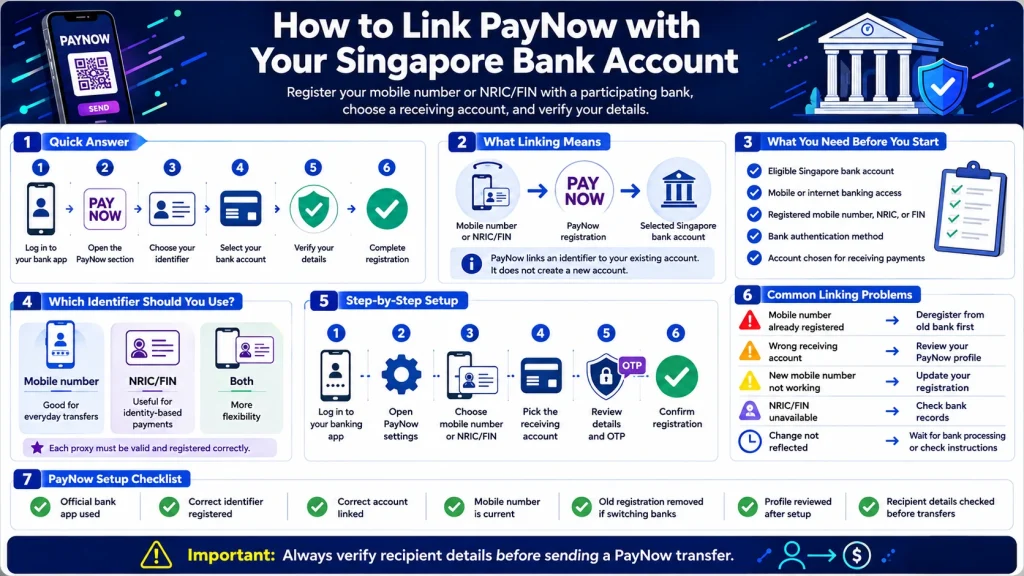
    To link PayNow with your bank account in Singapore, you register an eligible identifier, usually your mobile number or NRIC/FIN, with a participating bank and select the account where you want to receive PayNow transfers. Registration normally takes place through your bank’s mobile banking app or internet banking service.

    PayNow does not require you to create a separate bank account. Instead, it connects an eligible identifier to an existing Singapore bank account. Once registered, people sending money to your PayNow identifier do not need your full bank account number. PayNow supports instant SGD transfers through FAST between participating banks and major payment institutions.

    If you are preparing PayNow for online payments, our PayNow Casino Singapore guide explains how the payment method fits into deposits, withdrawals, transaction checks, and other common payment situations.

    link paynow bank account

    Quick Answer

    To link PayNow to a bank account, log in to your participating bank’s mobile app or internet banking platform, open the PayNow registration section, choose your mobile number or NRIC/FIN, select the bank account you want to connect, verify the information, and complete registration.

    The Association of Banks in Singapore states that linking your mobile number and/or NRIC/FIN to your bank account is a one-time registration process. An SMS verification process might also be required, depending on your bank.

    What Does Linking PayNow to a Bank Account Mean?

    When you connect PayNow to a bank account, you are registering an identifier that directs incoming PayNow payments to a chosen account.

    For individual bank customers, common PayNow identifiers include:

    • Mobile number
    • Singapore NRIC
    • FIN

    PayNow also supports UENs for entities and Virtual Payment Addresses for certain payment institution users.

    For example, if you link your Singapore mobile number to your savings account, someone sending money through PayNow to your registered mobile number directs the transfer to that linked account.

    Your bank account number does not become your PayNow identifier.


    What Do You Need Before Registering PayNow?

    Before starting your PayNow bank account setup, check that you have access to a participating Singapore bank or eligible payment institution.

    For most individual bank customers, you will need:

    • An eligible Singapore bank account
    • Access to mobile or internet banking
    • Your bank-registered mobile number, NRIC, or FIN
    • Access to any authentication method requested by your bank
    • An account you want to use for receiving PayNow payments

    The exact screens and authentication process differ between banks, but the underlying registration process follows the same principle.

    How to Link PayNow to Your Bank Account

    The exact menu names depend on your bank, but you generally follow these steps.

    Step 1: Log In to Your Banking App

    Open your bank’s official mobile banking app or internet banking service and sign in.

    Do not register PayNow through links received from unknown messages, advertisements, or unofficial websites. Start from your bank’s official app or website.

    Step 2: Open the PayNow Section

    Find PayNow within your bank’s payment, transfer, or account services.

    The location differs by bank. For example, DBS places PayNow registration within its PayNow profile, while OCBC provides PayNow management within its digital banking settings and PayNow management functions.

    Step 3: Choose Your PayNow Identifier

    Choose the identifier you want to register.

    For most personal bank accounts, this will be your:

    • Mobile number
    • NRIC/FIN

    You should check which option suits how you want to receive payments.

    Step 4: Select the Bank Account to Link

    Choose the account where incoming PayNow payments should be credited.

    This step is important if you have several accounts with the same bank. Check the selected account carefully before completing registration.

    DBS, for example, asks customers to select the account they want to link when registering their mobile number or NRIC/FIN for PayNow.

    Step 5: Verify Your Details

    Review the registered identifier and selected bank account.

    Depending on your bank, you might need an OTP or another bank authentication method to complete the registration. The ABS PayNow fact sheet states that SMS OTP verification might be required during registration.

    Step 6: Complete the Registration

    Submit the registration and check that your PayNow profile shows the correct linked account.

    Once the registration is active, eligible PayNow transfers sent to your registered identifier should be directed to the selected account.

    PayNow Registration Examples for Singapore Banks

    Bank Registration Method Identifier Options Account Selection
    DBS/POSB digibank mobile or online Mobile number, NRIC/FIN Select eligible account
    OCBC OCBC app or online banking Mobile number, NRIC/FIN Select receiving account
    UOB UOB TMRW or internet banking Mobile number, NRIC/FIN Link to eligible account

    DBS states that customers can register a mobile number or NRIC/FIN through digibank and choose the account they want to link. OCBC provides PayNow registration and account selection through digital banking. UOB also supports registration of a mobile number and/or NRIC/FIN through UOB TMRW or Personal Internet Banking.

    Should You Link Your Mobile Number or NRIC/FIN to PayNow?

    Both options serve as identifiers for receiving PayNow transfers, but they might be useful in different situations.

    Identifier Useful For Key Point
    Mobile number Everyday person-to-person transfers Easy for people who already know your number
    NRIC/FIN Payments tied to your identity Does not depend on sharing your mobile number
    Both Wider flexibility Each proxy needs valid registration

    You do not need to share your bank account number when someone sends you money through a registered PayNow identifier.

    For everyday transfers, a mobile number is often convenient. For some official payouts, an NRIC-linked PayNow registration is used instead. UOB, for example, states that NRIC registration is required for certain government payments through PayNow.

    Can the Same Mobile Number Be Linked to Two Banks?

    No. The same PayNow proxy should not be registered with two banks simultaneously.

    DBS states that if your mobile number or NRIC/FIN is already registered as a PayNow proxy with another bank, you first need to deregister it from the existing bank before registering it with DBS/POSB.

    This becomes important when switching banks.

    For example:

    Current setup:

    Mobile number → Bank A

    Desired setup:

    Mobile number → Bank B

    You generally need to remove the existing Bank A registration before registering the same mobile number with Bank B.

    How to Change the Bank Account Linked to PayNow

    If you want to receive PayNow transfers through another account, start by checking whether the new account belongs to the same bank or a different bank.

    Changing Accounts Within the Same Bank

    Your banking app might offer a PayNow management function where you update the account linked to your identifier.

    The exact process depends on your bank.

    Check the PayNow profile or PayNow management section and review the receiving account before making changes.

    Moving PayNow to Another Bank

    If you want to connect PayNow to a bank account at another bank, you generally need to deregister the existing proxy before registering it with the new institution.

    Do not assume opening a new bank account automatically moves your PayNow registration. Check the existing proxy registration first.

    What Happens If You Change Your Mobile Number?

    If you change your mobile number, update your PayNow registration as well.

    The ABS PayNow fact sheet states that customers should report mobile number changes to their bank or payment institution. The old number should be delinked, followed by registration of the new number. If the new number is not registered, you will not receive PayNow payments through it.

    This is especially important before expecting a payment or using PayNow-linked payment services.

    How to Check If Your PayNow Account Is Linked Correctly

    After registration, check your PayNow profile through your banking app.

    Confirm:

    • Your registered mobile number or NRIC/FIN
    • Your linked receiving account
    • Your bank account is active
    • Your personal details are current
    • Any registration change has been completed

    If you recently switched banks or mobile numbers, check your profile before receiving a large transfer.

    A small test transfer between accounts under your control, where supported, also helps confirm which account currently receives payments.

    Does Linking PayNow Automatically Allow Casino Deposits?

    No. Registering PayNow with your bank account and making a payment to an online platform are separate actions.

    PayNow registration determines how your identifier connects with your bank account. A deposit still requires you to follow the payment instructions provided for the transaction.

    Before sending a payment, verify the recipient details displayed by your bank. PayNow requires users to review recipient information before confirming a transfer.

    For the deposit process, see How to Deposit Using PayNow at an Online Casino.

    What Should You Check Before Sending a PayNow Payment?

    Linking PayNow correctly does not remove the need to check each transaction.

    Before confirming a transfer:

    • Check the recipient information.
    • Check the payment amount.
    • Confirm you are using the intended bank account.
    • Review any transaction reference.
    • Do not share OTPs or banking passwords.
    • Keep a record of the completed transfer.

    ABS instructs users to verify the recipient before confirming a PayNow transfer.

    This becomes especially important because completed instant transfers might be difficult to correct after money reaches the wrong recipient.

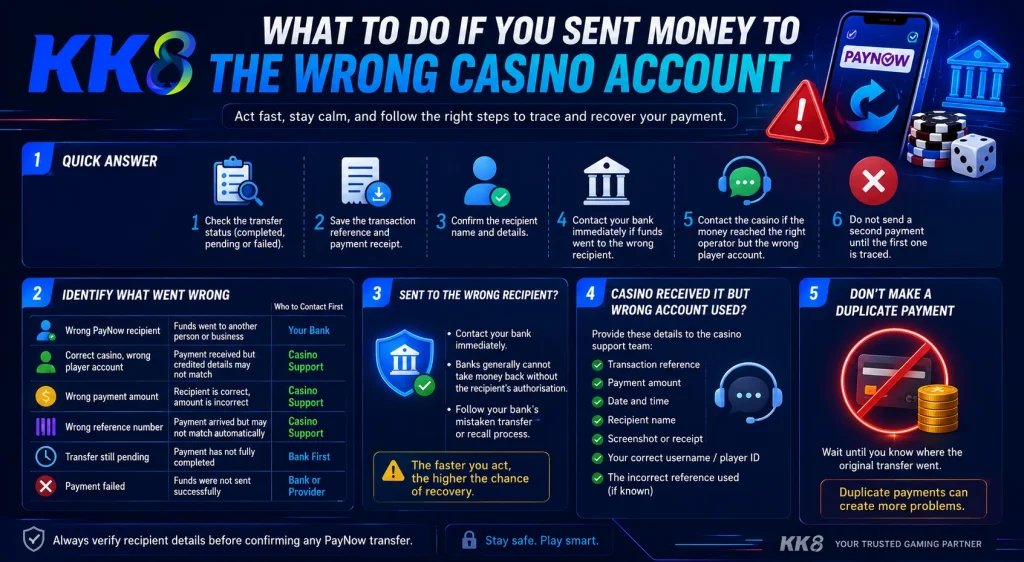
    If you send a payment to the wrong gaming account, see What to Do If You Sent Money to the Wrong Casino Account.

    Common PayNow Linking Problems

    Problem Possible Reason What to Check
    Mobile number already registered Proxy linked to another bank Check existing PayNow registration
    Wrong receiving account Another account selected Review PayNow profile
    Cannot register mobile number Bank records differ Check registered personal details
    New mobile number not working Old number still linked Update PayNow registration
    NRIC/FIN unavailable Bank records need updating Contact your bank
    Registration change not reflected Bank security process still active Check bank instructions

    For example, DBS notes that a recycled mobile number might already have a PayNow registration belonging to its previous owner. In this situation, the bank asks customers to contact it for assistance.

    PayNow Bank Account Setup Checklist

    Check Completed?
    Banking app is from the official bank Yes / No
    Correct PayNow identifier registered Yes / No
    Correct receiving account linked Yes / No
    Mobile number is current Yes / No
    NRIC/FIN details are current Yes / No
    Old bank registration removed if switching banks Yes / No
    PayNow profile reviewed after setup Yes / No
    Recipient details checked before transfers Yes / No

    If you plan to use PayNow with an online gaming platform, also check the platform itself before depositing. Our How to Verify a PayNow Casino Before Depositing guide covers payment information, platform checks, and warning signs to review first.

    Frequently Asked Questions

    How do I link PayNow to my bank account?

    Log in to your bank’s mobile app or internet banking service, find PayNow registration, choose your mobile number or NRIC/FIN, select the receiving bank account, verify the information, and complete registration. Exact menu names differ between banks.

    Do I need a separate account for PayNow?

    No. PayNow links an eligible identifier to an existing participating bank or payment institution account. It does not require a separate PayNow bank account.

    Can I link my mobile number to PayNow?

    Yes. Individual users at participating institutions can register an eligible mobile number as their PayNow identifier. Your bank then links the number to the receiving account you select.

    Can I link the same mobile number to two different banks?

    A PayNow proxy such as the same mobile number should not be registered to two banks at the same time. If moving it to another bank, deregister it from the existing institution before registering it with the new one.

    What should I do if my PayNow mobile number is already registered?

    Check whether you previously linked it to another bank. If you do not recognize the registration, contact your bank. A recycled mobile number might also retain an earlier registration associated with its previous owner.

  • Why Was My PayNow Payment Rejected?

    Why Was My PayNow Payment Rejected?

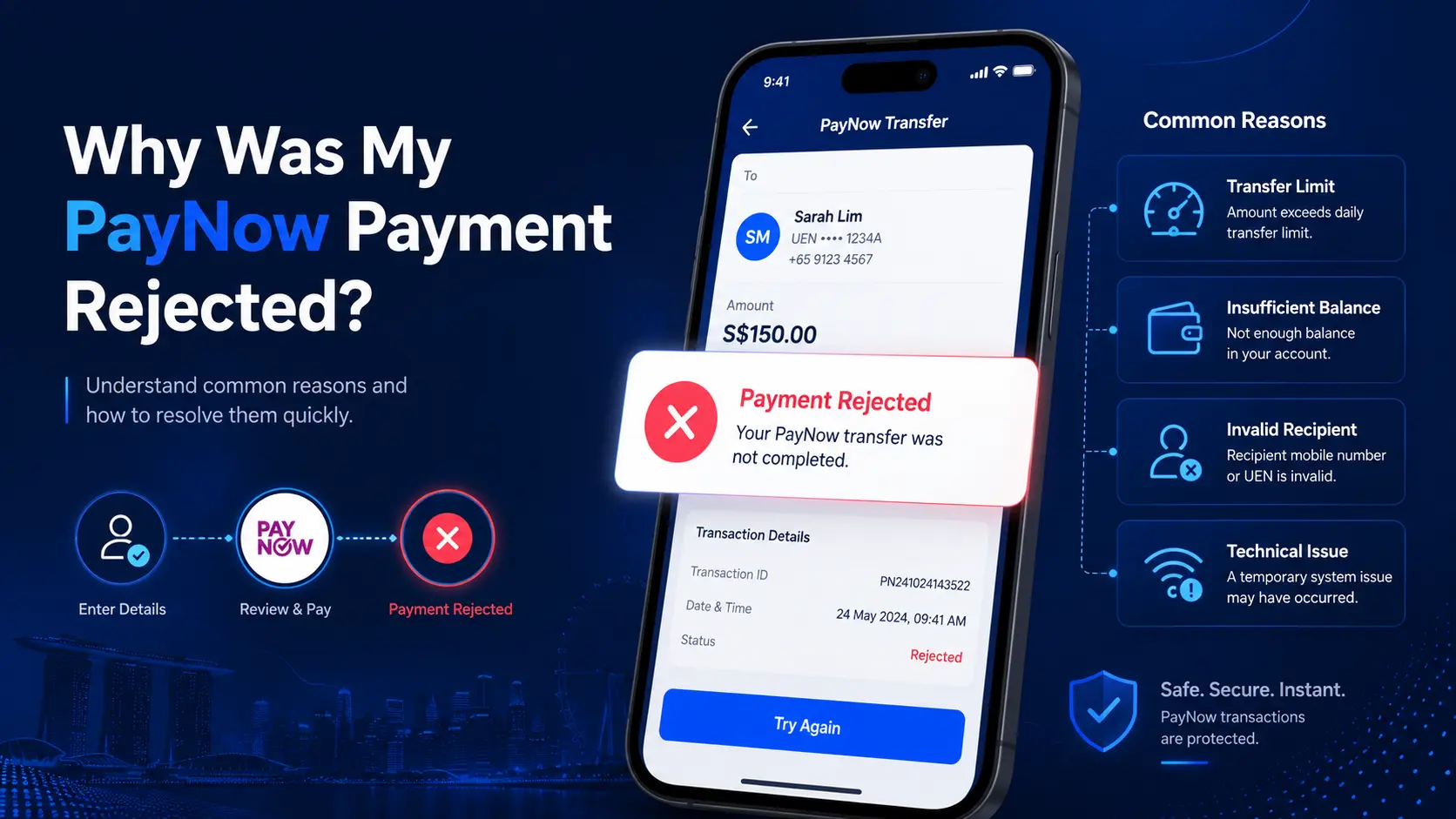
    A rejected PayNow payment usually means the transfer did not complete successfully. The cause might be as simple as an exceeded transfer limit, insufficient available funds, an invalid recipient, or a temporary banking issue.

    The first step is not to send the payment again. Check your bank transaction history and confirm what happened to the original transfer.

    A rejected payment is also different from a successful PayNow transfer that has not appeared in your casino balance. If your bank already shows the payment as successful, the issue sits later in the payment process.

    Explore More: PayNow Casino Singapore

    First, Check Your PayNow Transaction Status

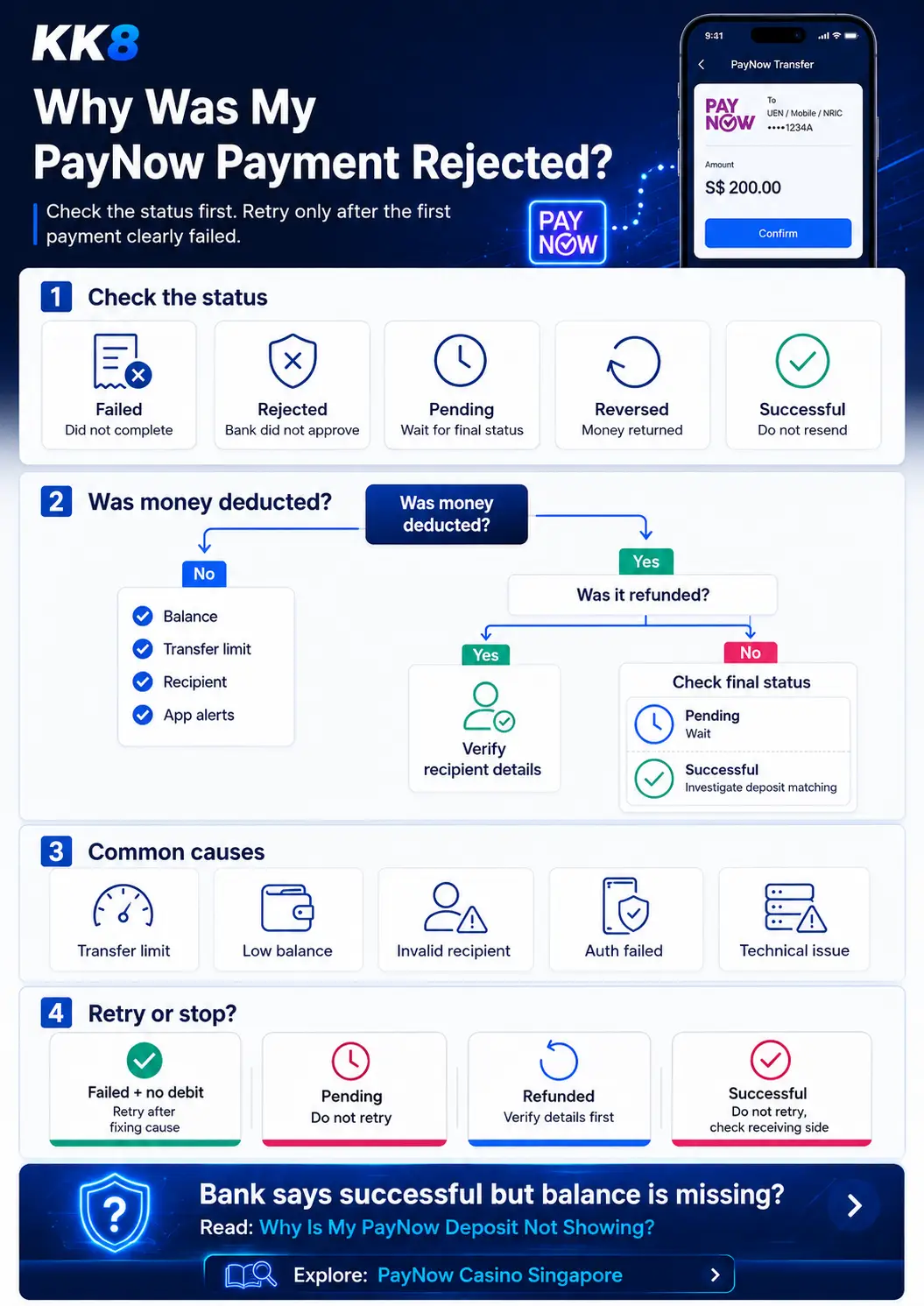
    The word “rejected” is often used broadly, but different transaction statuses mean different things.

    Transaction status What it usually means Should you send another payment?
    Failed The transfer did not complete Only after identifying the cause
    Rejected The bank did not approve the transfer Check the rejection reason first
    Pending The transaction has no final status yet No
    Reversed Funds were deducted and later returned Check why it was reversed
    Successful The bank completed the transfer No

    This distinction matters. If your bank shows “successful” but your casino balance has not changed, the payment itself was not rejected at the banking stage.
    Read more: Why Is My PayNow Deposit Not Showing?

    Was Money Deducted From Your Bank Account?

    This is the fastest way to narrow down the problem. It helps you quickly identify whether the issue is with your bank, your balance, or the recipient details.

    If No Money Was Deducted

    The transfer likely failed before settlement. Check:

    • Your available balance
    • Your transfer limit
    • The recipient details
    • Any authentication request
    • Your bank app for an error message
    • Whether the bank is undergoing maintenance

    Do not assume the transfer failed for one specific reason unless the bank provides an error message.

    If Money Was Deducted

    Check the transaction history again. There are three common outcomes.

    Funds were returned:
    The payment might have been reversed.

    Transaction is still pending:
    Wait for a final status before making another transfer.

    Transaction shows successful:
    The banking transfer completed. The issue might sit with payment matching or account crediting instead.

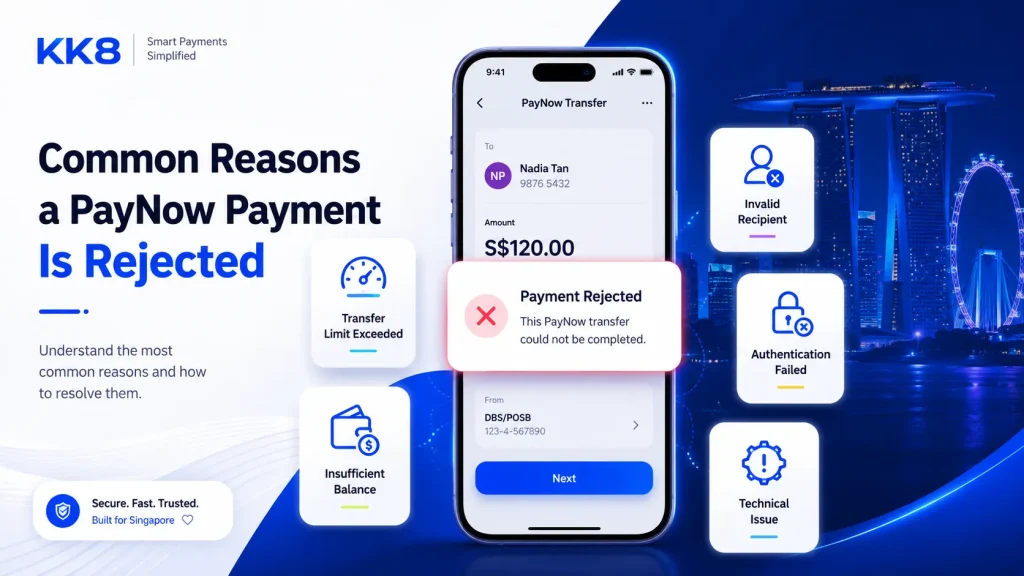
    Common Reasons a PayNow Payment Is Rejected

    Common reasons a PayNow payment is rejected, including transfer limits, insufficient balance, invalid recipient, authentication failure, and technical issues

    You Exceeded Your Transfer Limit

    Having enough money in your bank account does not always mean you have enough transfer allowance remaining. Banks apply transaction limits, and these limits differ between banks and account settings.

    Example:

    Your configured daily transfer limit is S$1,000.

    You already transferred S$750 earlier in the day.

    Your remaining allowance is:

    S$1,000 – S$750 = S$250

    If you attempt another S$400 transfer, the payment exceeds your remaining allowance by S$150. Your account might still contain several thousand dollars, but the payment might fail because of the transfer limit.

    Check your bank app for your current PayNow or transfer limit rather than relying on a general figure found online.

    Your Available Balance Is Too Low

    A transfer might also fail when your available balance is lower than the amount you are trying to send. Available balance is more useful than the headline account balance.

    For example, your account might show S$500, but some funds might already be reserved for other transactions. If only S$320 is available and you attempt a S$400 payment, the transfer will not complete.

    Check the available balance shown in your banking app before retrying.

    The Recipient Details Are Invalid

    PayNow transfers depend on valid recipient information. Depending on the payment setup, this might involve:

    • A mobile number
    • A UEN
    • A PayNow QR code
    • Another supported PayNow identifier

    If the recipient information is incorrect or no longer valid, the transfer might fail. Always check the recipient name shown by your bank before approving a PayNow payment. Do not rely only on an old screenshot or previously saved QR code if the receiving details have changed.

    Read more: What to Do If You Sent Money to the Wrong Casino Account

    The Recipient Account Is Inactive or Unavailable

    A PayNow payment might also fail when the receiving account is no longer active or temporarily unable to accept the transfer. In some cases, the transfer might first appear to debit your account and then be returned.

    If this happens:

    1. Check whether a refund appears in your transaction history.
    2. Verify the recipient information.
    3. Confirm you are using the current payment instructions.
    4. Do not keep sending repeated transfers to the same recipient without identifying the problem.

    The Transaction Was Not Fully Authorised

    Banks use security checks to confirm certain transactions. If an authentication step is interrupted, expires, or is not completed, the transfer might fail.

    Examples include:

    • Leaving the banking app during approval
    • Missing an authorisation request
    • Session expiry
    • Device authentication problems

    If the bank asks you to authenticate the transaction, complete the approval through the official bank app. Avoid approving unexpected payment requests.

    Read more: How to Keep Your PayNow Casino Transactions Secure

    Your Bank Is Experiencing a Technical Problem

    A rejected transaction is not always caused by your account. Banking apps and payment services sometimes experience temporary maintenance or technical problems.

    You might see messages such as:

    • Service temporarily unavailable
    • Transaction unsuccessful
    • Unable to process request
    • Please try again later

    Before attempting another payment, check your transaction history. You want to confirm whether the original transfer was recorded before starting a new one. This reduces the risk of sending the same payment twice.

    Where Can a PayNow Payment Fail?

    A PayNow payment involves more than one step. A simplified payment path looks like this:

    Your bank account → Bank checks → PayNow payment instruction → FAST transfer → Recipient institution → Payment matching → Casino account balance

    Different problems happen at different stages.

    Stage Possible issue
    Your account Insufficient available funds
    Bank checks Transfer limit or authentication issue
    Payment network Temporary technical issue
    Recipient Invalid or inactive recipient
    Payment matching Payment cannot be matched to your account
    Casino balance Deposit has not been credited yet

    This is why “my PayNow payment failed” and “my PayNow deposit is missing” should not be treated as the same problem.

    PayNow Rejected vs Casino Deposit Rejected

    This distinction is important when troubleshooting an online casino payment. A bank rejection means the transfer itself did not complete. A casino deposit rejection might happen after the payment process reaches a later stage.

    Bank status Casino status What it suggests
    Failed No deposit Transfer did not complete
    Pending No deposit Banking status is unresolved
    Successful Deposit missing Receiving-side investigation is needed
    Successful Deposit rejected Platform-side payment review might be involved
    Reversed No deposit Funds were returned

    If your banking app says “successful,” do not automatically send another payment because the casino balance has not updated.
     

    What Should You Check Before Trying Again?

    Use this checklist before submitting another PayNow payment:

    • Check the transaction history
    • Confirm whether money was deducted
    • Check whether the money was refunded
    • Read the exact error message
    • Check your available balance
    • Check your remaining transfer limit
    • Verify the recipient name
    • Verify the PayNow identifier or QR code
    • Check whether the transaction is still pending
    • Check for bank maintenance or service disruption

    Most importantly, do not resend a payment that still shows as pending or successful.

    Should You Retry a Rejected PayNow Payment?

    It depends on the transaction status.

    Situation Retry? What to do first
    Failed and no money was deducted Yes, after fixing the issue Check the rejection reason
    Transfer limit exceeded After adjusting the amount or limit Check remaining allowance
    Insufficient balance After resolving the balance issue Check available funds
    Pending No Wait for a final status
    Debited and refunded Only after verifying details Check recipient information
    Successful No Investigate receiving-side processing

    Retrying without checking the original transaction increases the risk of duplicate payments.

    What If Money Was Deducted and Then Refunded?

    A deduction followed by a refund usually means the transfer did not complete as intended.

    Check:

    • The refund amount
    • The transaction reference
    • The recipient details
    • The final transaction status

    Example:

    10:12 AM
    PayNow transfer: -S$200

    10:13 AM
    Returned transfer: +S$200

    Your net balance has not changed, but the transaction history shows the payment attempt and reversal. Do not assume the second entry is a new deposit. Review both entries together.

    What If PayNow Says Successful but Your Casino Balance Is Missing?

    A successful PayNow status means the bank completed its part of the transfer. It does not always mean the receiving platform has already updated your gaming balance.

    The receiving platform might still need to:

    • Identify the payment
    • Match the transfer to your account
    • Review the payment reference
    • Update the account balance

    At this stage, sending another payment might create a duplicate deposit.

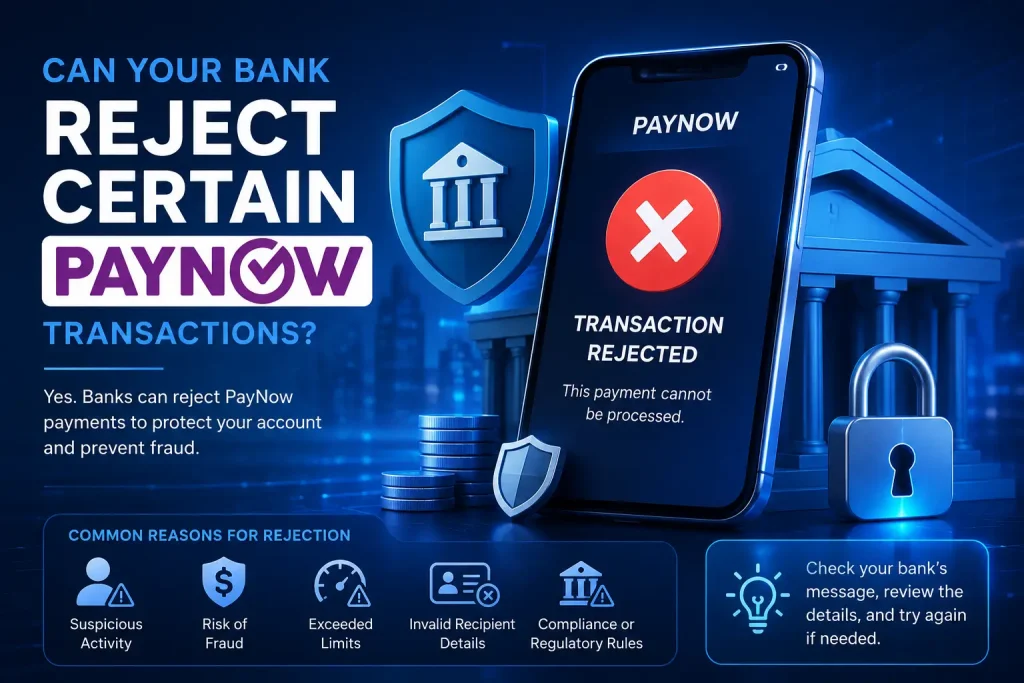
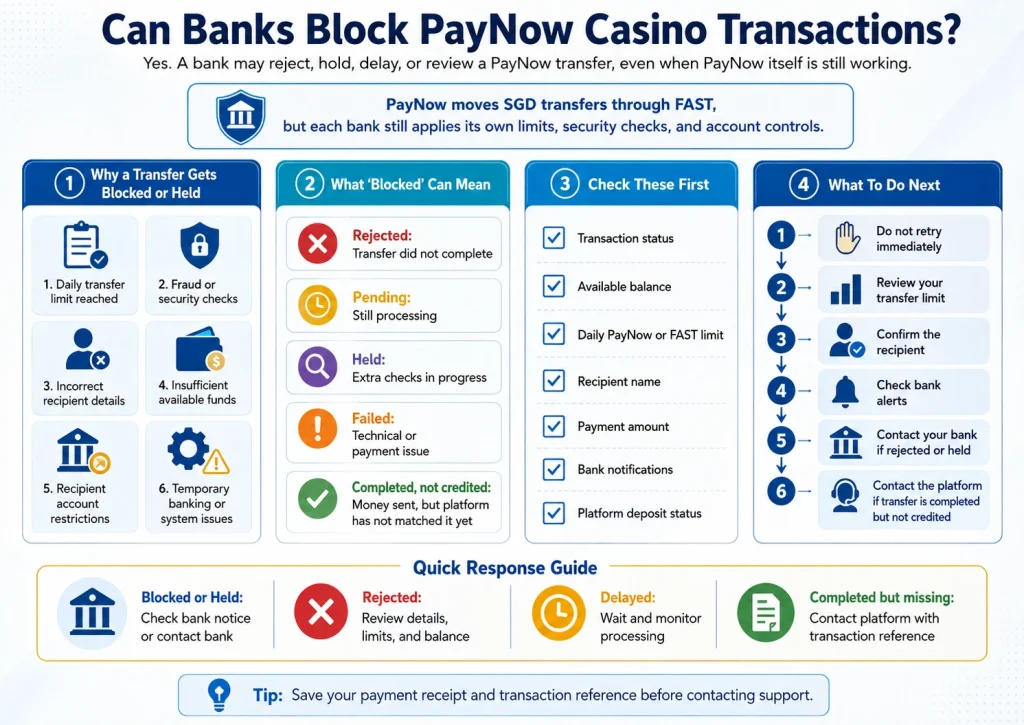
    Can Your Bank Reject Certain PayNow Transactions?

    Why a bank might reject certain PayNow transactions, including transfer limits, invalid recipient details, security checks, and technical issues

    Banks perform their own security, account, transaction-limit, and risk checks. A rejected transfer does not automatically mean PayNow itself is unavailable.

    If you repeatedly receive a rejection after checking your balance, limits, and recipient information, review the message from your bank or contact the bank directly.

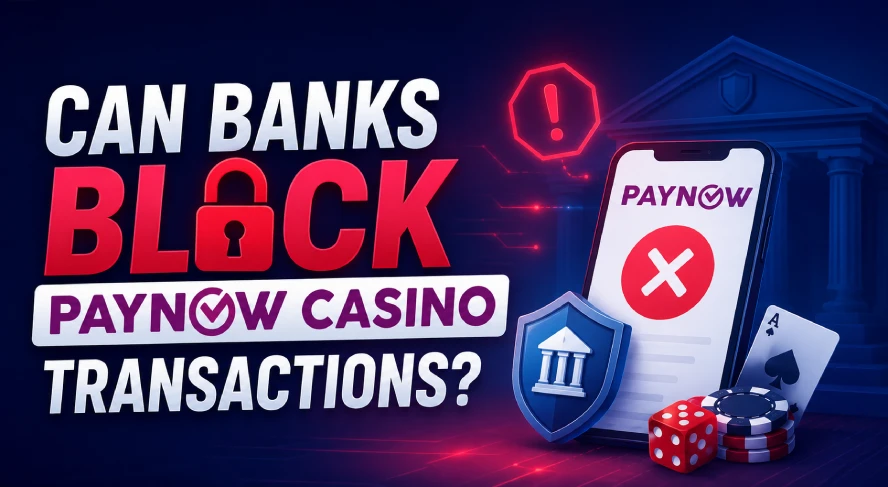
    Read more: Can Banks Block PayNow Casino Transactions?

    When Should You Contact Your Bank?

    Contact your bank when:

    • You cannot determine the final transaction status
    • Money was deducted but no clear outcome appears
    • A transfer keeps failing despite valid recipient information
    • An error message tells you to contact the bank
    • You do not recognise the transaction
    • A refund does not match the original payment
    • Your bank account shows conflicting transaction information

    Have these details ready:

    • Transaction amount
    • Date and time
    • Transaction reference
    • Recipient name
    • Error message
    • Screenshot of the transaction status, if available

    Do not share passwords, PINs, OTPs, or full login credentials with anyone.

    How to Reduce PayNow Payment Problems

    A few checks before sending a payment reduce avoidable errors.

    Review the Recipient: Confirm the name displayed by your bank before approving the transfer.

    Check Your Remaining Limit: Do not assume your full daily transfer allowance is still available.

    Check Your Available Balance: Use the available balance rather than the headline account balance.

    Follow Current Payment Instructions: Use the current PayNow details or QR provided for the transaction.

    Check the Final Status Before Retrying: A failed transaction and a pending transaction require different actions.

    Keep Your Banking Access Secure: Use your bank’s official app and review every payment before authorising it.

    A Simple PayNow Rejection Framework

    When a PayNow payment does not go through, use this order:

    Step 1: Check the transaction status.

    Step 2: Check whether money was deducted.

    Step 3: Check whether money was refunded.

    Step 4: Read the exact error message.

    Step 5: Check your available balance and transfer limit.

    Step 6: Verify the recipient.

    Step 7: Retry only after confirming the first payment failed.

    This sequence helps separate a genuine rejected transaction from a delayed or successfully completed payment.

    Frequently Asked Questions

    Why was my PayNow payment rejected?

    Common reasons include insufficient available funds, an exceeded transfer limit, invalid recipient details, authentication problems, recipient-account issues, or a temporary banking problem. Check the exact transaction status and error message first.

    Why did my PayNow payment fail even though I have enough money?

    Your account balance and transfer allowance are separate. You might have enough funds but still exceed your bank’s configured daily or transaction limit.

    Should I retry a failed PayNow payment?

    Only after confirming the first transaction failed. Do not retry while the payment remains pending or if your bank shows it as successful.

    Why was my PayNow payment deducted and then refunded?

    The transfer might have been reversed because it could not be completed. Check the recipient information and final transaction status before trying again.

    How do I know if my PayNow transfer was successful?

    Check your banking app’s transaction history. Look for the final status rather than relying only on a temporary notification.

    Can a PayNow payment stay pending?

    A transaction might temporarily appear without a final result. If it shows pending, avoid sending another payment until the bank provides a final status.

    What should I do if PayNow keeps getting rejected?

    Check your available balance, transfer limit, recipient details, authentication process, and bank service status. If no clear cause appears, contact your bank with the transaction reference and error message.

    What to Do Next

    If your PayNow transaction failed, identify the cause before making another payment. If the transaction shows successful but your casino balance is still missing, the problem has moved beyond the banking stage.

    For a broader explanation of PayNow deposits, payment checks, and transaction handling, refer to the PayNow Casino Singapore guide.

  • Why Is My PayNow Withdrawal Delayed?

    Why Is My PayNow Withdrawal Delayed?

    A PayNow withdrawal delayed after you submit a payout request does not always mean there is an issue with PayNow.

    A withdrawal usually passes through several stages before money reaches your bank account. The platform first receives your request, checks your account, reviews the payment details, approves the withdrawal, and then sends the funds.

    PayNow itself is designed for instant Singapore dollar transfers between participating banks and major payment institutions through FAST. It operates 24 hours a day, 365 days a year.

    Because of this, a delay often happens during the platform’s withdrawal process rather than during the PayNow transfer.

    If you are new to this payment method, read our PayNow Casino Singapore guide to understand how deposits, withdrawals, payment verification, and PayNow transactions fit together.

    Paynow withdrawal delayed

    Quick Answer

    If your PayNow withdrawal is pending, check the withdrawal status inside your account first. A status such as Pending, Processing, or Under Review generally means the platform has not completed its payout process.

    If the withdrawal shows Completed or Paid but your PayNow withdrawal is not received, check your bank transaction history and registered PayNow details before contacting support.

    PayNow supports instant SGD transfers through FAST, so the total PayNow withdrawal processing time often depends more on how long the platform takes to approve and initiate the payout.

    How Does a PayNow Withdrawal Work?

    A casino withdrawal is not the same thing as a PayNow transfer.

    The process usually looks like this:

    1. You submit a withdrawal request.
    2. The platform records the request.
    3. Your account and withdrawal details are reviewed.
    4. The withdrawal is approved.
    5. The payment is initiated.
    6. PayNow or the underlying banking network processes the transfer.
    7. The money reaches your receiving account.

    The first four stages belong mainly to the platform.

    The actual PayNow transaction starts later.

    This explains why a PayNow casino withdrawal delayed for several hours does not necessarily mean PayNow itself has been processing the transaction for several hours.

    For a step-by-step explanation of the payout process, see How to Withdraw Casino Winnings with PayNow.


    Common Reasons Your PayNow Withdrawal Is Delayed

    Reason What It Means What to Check
    Withdrawal still processing Platform has not approved it yet Withdrawal status
    Account verification required More account checks are needed Verification notifications
    Withdrawal under review Platform is checking the transaction Account messages
    Incorrect payment details Receiving information might not match PayNow registration
    Promotion conditions incomplete Withdrawal conditions might not be satisfied Promotion terms
    Payment marked completed Platform says funds were sent Bank transaction history
    Technical processing issue Payment needs further investigation Transaction reference

    1. Your Withdrawal Is Still Pending

    A PayNow withdrawal pending status usually means the platform has received the request but has not completed processing.

    The status might appear as:

    Pending

    Processing

    Submitted

    Awaiting Approval

    These statuses generally indicate that the payout has not reached the payment transfer stage.

    Avoid submitting another withdrawal while the first one is still active.

    Instead, check when the request was submitted and compare it with the platform’s stated processing period.

    2. Your Withdrawal Is Under Review

    A casino withdrawal under review means additional checks are taking place before the funds are released.

    The platform might review:

    Account ownership

    Identity verification

    Deposit history

    Withdrawal information

    Payment details

    Promotion requirements

    Unusual transaction activity

    A review does not mean the PayNow network is holding your money. The payout might not have been initiated yet.

    If verification appears to be the issue, our How to Verify a PayNow Casino Before Depositing guide explains which platform and payment details are worth checking before sending money.

    3. Your Account Verification Is Incomplete

    Some withdrawal requests require additional identity or payment verification.

    You might need to confirm:

    Your full name

    Registered account details

    Mobile number

    Bank account ownership

    Payment method

    Identity documents

    If the platform requests additional information, the withdrawal might remain pending until the checks are completed.

    This is one reason completing account verification before requesting a large withdrawal is useful.

    4. Your PayNow Details Are Incorrect or Outdated

    Check the receiving information before assuming the payout is missing.

    PayNow lets eligible users receive SGD transfers through registered identifiers such as a mobile number or NRIC/FIN. Participating entities also use UENs, while some payment institutions support Virtual Payment Addresses.

    DBS also states that a recipient needs to register an eligible PayNow proxy with a participating institution to receive money through the service.

    Check whether:

    Your mobile number is still linked to the correct bank account

    Your registered details are current

    The receiving account is active

    The withdrawal information matches your account

    If you recently changed your bank or mobile number, verify your PayNow setup inside your bank app.

    5. The Platform Has Not Approved the Withdrawal Yet

    Submitting a withdrawal does not mean the payout has already been sent.

    This distinction is important.

    A platform might show your request as received while it is still waiting for internal approval.

    Use the status to identify where the transaction sits.

    Status Likely Stage Next Step
    Pending Waiting for processing Monitor the request
    Processing Platform handling request Check stated processing period
    Under Review Additional checks Review account notifications
    Approved Internal approval completed Check whether payout was initiated
    Completed Platform reports payment sent Check bank account
    Rejected Request not processed Review rejection reason

    How Long Does a PayNow Withdrawal Take?

    There is no single PayNow withdrawal processing time for online gaming withdrawals.

    You need to separate two time periods.

    Platform Processing Time

    This is the time between submitting the withdrawal and the platform approving the payout.

    It depends on factors such as:

    Verification

    Internal processing

    Withdrawal queues

    Account checks

    Promotion requirements

    Payment review

    PayNow Transfer Time

    After a payment is initiated through PayNow, the transfer system is designed for instant SGD transfers through FAST.

    The Association of Banks in Singapore states that PayNow operates 24/7, 365 days a year.

    DBS also describes PayNow as an instant SGD funds transfer service.

    This means a long withdrawal wait should not automatically be described as a PayNow network delay.

    What If My Withdrawal Says Completed but I Have Not Received It?

    If your withdrawal status says Completed or Paid but the funds have not appeared, the situation is different from a pending withdrawal.

    First, open your bank app and review your transaction history.

    Check:

    Withdrawal amount

    Completion date

    Receiving account

    PayNow-linked details

    Incoming transactions

    Transaction reference

    Do not rely only on SMS or banking notifications.

    If the PayNow withdrawal is not received after the platform says it has been sent, ask the platform for a payout or transaction reference.

    This information helps establish whether the payment was initiated.

    You should also review How PayNow Transfers Work in Singapore if you want to understand what happens after a transfer enters the banking network.

    PayNow Withdrawal Troubleshooting Checklist

    Check Question
    Withdrawal status Is it pending, processing, approved, or completed?
    Submission time When did I request the withdrawal?
    Verification Is my account fully verified?
    PayNow details Are my registered details correct?
    Bank history Has the payment already arrived?
    Withdrawal ID Do I have the transaction reference?
    Promotion conditions Are all withdrawal requirements completed?
    Support Has the stated processing period passed?


    What Should You Do If Your PayNow Withdrawal Is Delayed?

    Follow these steps in order.

    Step 1: Check the Withdrawal Status

    Start with your withdrawal history.

    This tells you whether the payout is still being reviewed or has already been processed.

    Step 2: Check Account Notifications

    Look for requests for verification or additional information.

    Complete any required account checks before taking further action.

    Step 3: Confirm Your PayNow Registration

    Open your bank app and confirm where your PayNow identifier is registered.

    OCBC, for example, lets customers register a mobile number or NRIC for receiving PayNow payments.

    Step 4: Review Your Bank Transactions

    If the platform marks the withdrawal as completed, check the receiving account directly.

    Look for an incoming transfer matching the withdrawal amount.

    Step 5: Save the Withdrawal Information

    Keep a record of:

    Withdrawal ID

    Amount

    Submission time

    Current status

    Payment method

    Screenshots

    Transaction reference

    Step 6: Contact Support

    If the stated processing period has passed, ask support where the withdrawal sits.

    A useful question is:

    Has the withdrawal been approved internally, or has the PayNow payment already been initiated?

    This separates a platform delay from a payment transfer issue.

    Should You Make Another Withdrawal?

    Submitting another withdrawal usually does not resolve an existing delay.

    It might create two separate requests and make the transaction history harder to follow.

    Instead:

    Check the original request.

    Confirm its status.

    Complete outstanding verification.

    Contact support if necessary.

    Only submit another withdrawal after the original request has been cancelled, rejected, or resolved.

    A similar principle applies to deposits. If your payment has already been sent but is not showing, avoid immediately sending another transaction.

    See Why Is My PayNow Deposit Not Showing? for the equivalent deposit troubleshooting process.

    How Is a Withdrawal Delay Different From a Rejected Payment?

    A delayed withdrawal and a rejected payment are different problems.

    A delayed withdrawal is still active.

    A rejected payment has failed or been declined.

    For example:

    Pending means the transaction still needs action.

    Processing means the request is being handled.

    Rejected means the request did not complete.

    Completed means the platform reports that the payout was sent.

    If your transaction was rejected rather than delayed, read Why Was My PayNow Payment Rejected?

    How to Reduce PayNow Withdrawal Problems

    Before requesting a withdrawal:

    Confirm your account details.

    Complete required verification.

    Check your PayNow registration.

    Use a payment account registered in your name.

    Read the withdrawal conditions.

    Keep transaction records.

    Review promotion requirements before requesting a payout.

    You should also avoid sharing OTPs, passwords, or banking credentials with anyone claiming they need them to release a withdrawal.

    For more payment safety checks, read How to Keep Your PayNow Casino Transactions Secure.

    Frequently Asked Questions

    Why is my PayNow withdrawal delayed?

    A PayNow withdrawal delayed after a payout request often means the platform is still processing, reviewing, or approving the withdrawal. Check the status before assuming there is a PayNow transfer problem.

    Why is my PayNow withdrawal pending?

    A PayNow withdrawal pending status generally means the request has not completed the platform’s processing stage. Verification, account checks, or withdrawal review might still be taking place.

    How long does PayNow withdrawal processing take?

    The platform determines most of the total withdrawal processing time. Once a payment enters PayNow, the service is designed for instant SGD transfers through FAST.

    Why is my PayNow withdrawal not received after approval?

    Approval does not always mean payment has already been initiated. Check whether the status says Completed or Paid. If it does, review your bank account and request the transaction reference from the platform.

    What does casino withdrawal under review mean?

    A casino withdrawal under review means the platform is performing additional checks before releasing the payout. These checks might involve verification, account activity, payment ownership, or withdrawal conditions.

  • What to Do If You Sent Money to the Wrong Casino Account

    What to Do If You Sent Money to the Wrong Casino Account

    A wrong PayNow transfer casino payment needs quick attention. Because PayNow moves funds in real time through participating banks and financial institutions, a mistaken transfer may reach the recipient almost immediately. The Association of Banks in Singapore specifically advises users to verify the recipient’s name before confirming a PayNow transfer.

    If you sent money to the wrong casino account, entered the wrong PayNow details, or selected an incorrect recipient, don’t make another payment straight away. First, confirm what happened and keep the transaction details.

    For a broader overview of PayNow deposits, withdrawals and payment issues, read our PayNow Casino Singapore guide.

    wrong paynow transfer casino

    Quick Answer

    If you made a wrong PayNow payment, take these steps:

    1. Check whether the transfer is completed, pending or failed.
    2. Save the transaction reference and payment receipt.
    3. Confirm the recipient name and details.
    4. Contact your bank immediately if funds went to the wrong recipient.
    5. Contact the casino if the money reached the right operator but the wrong player account.
    6. Do not send a second payment until the first one is traced.

    DBS advises customers who accidentally transfer funds to the wrong PayNow proxy to contact the bank immediately and follow its mistaken-transfer process.

    First Identify What Went Wrong

    Not every wrong transfer is the same.

    Situation What It Means Who to Contact First
    Wrong PayNow recipient Funds went to another person or business Your bank
    Correct casino, wrong player account Casino received payment but credited details may not match Casino support
    Wrong payment amount Recipient is correct, amount is incorrect Casino support
    Wrong reference number Payment arrived but may not match automatically Casino support
    Transfer still pending Payment has not fully completed Bank first
    Payment failed Funds were not sent successfully Bank or payment provider

    What If You Sent PayNow to the Wrong Recipient?

    A PayNow transfer to the wrong recipient is different from sending money to the right casino with the wrong account reference.

    If the funds went to a completely different PayNow recipient, contact your bank as soon as possible.

    DBS states that customers who send a local transfer to the wrong recipient should contact the recipient directly or inform the bank immediately.

    The Association of Banks in Singapore also explains that banks generally cannot simply take money back from a recipient’s account without authorisation.

    This is why fast action matters.

    Can a Wrong PayNow Transfer Be Reversed?

    There is no guaranteed automatic reversal.

    Once a PayNow transfer has reached the recipient, the bank may need to start a recovery or recall process.

    The exact procedure depends on your bank and the circumstances of the transfer.

    For example, OCBC provides a funds recall process for FAST and PayNow transfers under its e-payment protection procedures.

    The practical rule is simple: contact your bank immediately instead of waiting to see whether the payment comes back on its own.

    What If the Casino Received the Money but the Wrong Account Was Used?

    Sometimes the bank transfer itself is correct.

    The problem happens because you entered:

    • The wrong casino username
    • An incorrect player ID
    • The wrong reference number
    • Another account’s deposit details
    • An outdated payment reference

    In this situation, the bank may show the transfer as successfully completed.

    Your next step is to contact the casino’s payment or customer support team.

    Provide:

    • Transaction reference
    • Payment amount
    • Date and time
    • Recipient name
    • Screenshot or receipt
    • Your correct casino username or player ID
    • The incorrect reference used, if known

    This gives the platform enough information to trace the payment internally.

    Don’t Make a Duplicate Payment

    One of the easiest mistakes is sending the payment again because the balance hasn’t updated.

    Avoid doing this until you know where the original transfer went.

    If the first payment is later matched successfully, the second transfer creates another problem.

    If your payment went to the right casino but hasn’t appeared in your balance, read Why Is My PayNow Deposit Not Showing?

    How to Recover a Wrong PayNow Transfer

    If you need to recover a wrong PayNow transfer, use this order.

    Step 1: Save the Payment Evidence

    Keep your transaction confirmation.

    Record:

    • Transaction reference
    • Date
    • Time
    • Amount
    • Recipient name
    • PayNow identifier used

    Don’t edit or crop out important details from the receipt.

    Step 2: Check the Recipient

    Open your banking transaction history and confirm exactly who received the funds.

    This tells you whether the issue belongs with your bank or the casino.

    Step 3: Contact Your Bank

    If you sent funds to the wrong PayNow recipient, contact your bank immediately through its official support channel.

    DBS, for example, tells customers to report erroneous PayNow transfers immediately.

    Step 4: Contact the Casino

    If the recipient is the correct casino or payment account, give the casino support team the transaction details.

    Ask them to trace the payment against your correct player account.

    Step 5: Follow the Recovery Process

    Your bank or casino may ask for additional information.

    Respond quickly and keep records of the case number, emails or support chat.

    Can You Get a PayNow Casino Payment Refund?

    A PayNow casino payment refund depends on what happened.

    If money went to the wrong recipient, your bank may try to recover it. Recovery is not the same as a guaranteed refund.

    If the casino received the funds correctly but they were associated with the wrong player account, the platform may be able to investigate and reassign or return the payment according to its payment policy.

    Do not assume either outcome until the bank or platform confirms it.

    Why PayNow Transfers Need Careful Checking

    PayNow is designed for fast payments. Participating banks use identifiers such as mobile numbers, NRIC/FIN, UEN and Virtual Payment Addresses instead of requiring users to enter full bank account numbers.

    That convenience makes checking the recipient especially important.

    Before approving a transfer, review:

    • Recipient name
    • Amount
    • Reference
    • UEN or PayNow identifier
    • Casino account details

    The ABS PayNow guidance specifically tells users to verify the recipient’s name before confirming the transfer.

    Common Wrong PayNow Transfer Scenarios

    Mistake Likely Result Next Action
    Wrong mobile number Funds may reach another PayNow user Contact bank
    Wrong UEN Funds may reach another business Contact bank
    Wrong player ID Casino may receive funds but fail to match them Contact casino
    Wrong payment reference Manual matching may be needed Contact casino
    Wrong amount Deposit may require manual review Contact casino
    Duplicate payment Two transfers may be recorded Contact casino

    How to Avoid Sending Money to the Wrong Casino Account

    A few checks before payment reduce the risk.

    • Confirm the recipient name before authorising.
    • Use the latest payment details shown by the platform.
    • Check your player ID or deposit reference.
    • Enter the exact requested amount.
    • Avoid copying details from old screenshots or messages.
    • Save the transaction reference after payment.
    • Never rush a transfer because of a countdown or promotion.

    For a complete deposit walkthrough, read How to Deposit Using PayNow at an Online Casino.

    What If the Casino Says It Cannot Find the Payment?

    Start by confirming that your bank shows the transaction as completed.

    Then compare:

    • Recipient name
    • Transaction reference
    • Payment time
    • Amount
    • Deposit reference
    • Player account

    If everything matches, send the casino the original transaction confirmation and ask for a manual payment trace.

    If the bank does not show a completed payment, the issue may still sit on the banking side.

    What If the Payment Was Rejected Instead?

    A rejected payment is not the same as a wrong transfer.

    If the transfer never completed, the money may not have left your account at all.

    Common causes include:

    • Incorrect recipient details
    • Transfer limits
    • Insufficient balance
    • Security checks
    • Inactive payment details

    Read Why Was My PayNow Payment Rejected? for the next steps.

    Wrong Transfer vs Missing Deposit

    Problem Bank Status Typical Issue
    Wrong transfer Completed Funds reached wrong recipient
    Wrong casino reference Completed Casino cannot match payment
    Missing deposit Completed Platform processing delay
    Rejected payment Failed/rejected Transfer never completed
    Pending transfer Pending Banking process not finished

    Frequently Asked Questions

    What should I do if I sent PayNow to the wrong casino account?

    Save the transaction reference and check the recipient. If funds went to the wrong PayNow recipient, contact your bank immediately. If the correct casino received the payment but the wrong player details were used, contact the casino.

    Can my bank reverse a wrong PayNow transfer?

    The bank may start a recovery process, but the funds are not automatically reversed after they reach the recipient. ABS explains that banks generally need recipient authorization before debiting funds from the recipient’s account in a mistaken-transfer case.

    How long does PayNow transfer recovery take?

    There is no single recovery time. It depends on the bank, recipient, transfer details and whether additional investigation is required.

    Should I send another deposit if the first one went to the wrong account?

    Not until the first transaction has been checked. Sending another payment too soon may create a duplicate transaction.

    What information should I give the casino?

    Provide the transaction reference, amount, date, time, recipient name, payment receipt and your correct casino account details.

  • Why Is My PayNow Deposit Not Showing?

    Why Is My PayNow Deposit Not Showing?

    A PayNow deposit that does not appear immediately can be confusing, especially when your bank app already shows the transfer as successful.

    The first thing to understand is that a PayNow transfer and a credited deposit are not always the same event. Your bank may complete the transfer successfully, but the receiving platform still needs to identify the payment, match it to your account, and update your balance. If your PayNow deposit is pending, work through the checks below before making another payment.

    Explore More: PayNow Casino Singapore

    First, Check Your PayNow Transaction Status

    Start with your bank app. The transaction status gives you the quickest indication of where the problem sits.

    Bank status What it usually means What to check next
    Successful The bank completed the transfer Check recipient and deposit status
    Pending The transaction has not reached a final status Monitor your banking app
    Failed The transfer did not complete Check the failure reason
    Reversed Funds were returned after an attempted transfer Review your transaction history

    A successful PayNow transfer means the banking stage completed. It does not always mean the receiving platform has already credited the funds to your gaming balance.

    Where Can a PayNow Deposit Get Stuck?

    A useful way to troubleshoot a missing deposit is to separate the payment into five stages.

    1. Bank initiation

    You enter the recipient details, amount, and payment information in your banking app.

    At this stage, problems may include:

    • insufficient account balance
    • transfer limits
    • bank security checks
    • incorrect recipient details
    • temporary banking issues

    2. PayNow and FAST transfer

    PayNow transfers Singapore-dollar payments through FAST between participating financial institutions. If the bank still shows the transaction as pending or failed, the problem may still be at the payment stage.

    3. Recipient receives the payment

    Once the banking transfer succeeds, the funds reach the recipient account. You should still confirm that the recipient name shown in your transaction history matches the intended recipient.

    4. The payment is matched

    The receiving platform may need to connect the incoming payment to a specific deposit request or customer account. This is sometimes called payment reconciliation.

    Matching may depend on information such as:

    • deposit amount
    • payment reference
    • deposit ID
    • account information

    5. Your balance is credited

    Only after the payment has been identified and processed does the platform update your balance. This is why a bank may show “Successful” while your gaming account still shows no new funds.

    Read More: How PayNow Transfers Work in Singapore

    Common Reasons Your PayNow Deposit Is Pending

    Common reasons a PayNow deposit is pending, including bank delays, wrong recipient details, amount mismatch, reference mismatch, delayed crediting, and manual review

    The bank transfer is still pending

    If the banking app itself shows “Pending”, the transfer has not reached a final status. Check:

    • whether your bank has posted any maintenance notices
    • your PayNow or transfer limits
    • whether the transaction eventually changes to successful, failed, or reversed

    Do not assume the recipient received the money while your bank still shows a pending status.

    The PayNow transfer failed

    A failed transaction generally means the transfer did not complete. Your bank app may show an error or rejection message.

    Common situations include:

    • incorrect payment details
    • account restrictions
    • transfer limits
    • recipient availability
    • security checks

    Check the exact error message before trying again.

    Read more: Why Was My PayNow Payment Rejected?

    The transfer was reversed

    Sometimes a transaction appears to start successfully but the money later returns to your account. This is different from a deposit being successfully received but not credited.

    Check your bank transaction history to confirm whether:

    • funds remain deducted
    • funds were returned
    • the transaction status changed

    The recipient details were incorrect

    PayNow payments may use identifiers such as:

    • mobile number
    • NRIC or FIN where supported
    • UEN
    • Virtual Payment Address
    • PayNow QR code

    Always verify the recipient name shown by your banking app before confirming a transfer. If the money went to the wrong recipient, treat it as a payment error rather than a normal pending deposit.

    Read more: What to Do If You Sent Money to the Wrong Casino Account

    The deposit amount does not match

    Some payment systems use the exact amount to help identify and match incoming payments.

    For example:

    Deposit request: SGD50

    Amount sent: SGD55

    The bank transfer itself might succeed, while the platform needs additional processing to determine which deposit request the SGD55 belongs to. Not every platform handles this situation in the same way, but sending the exact amount shown in the payment instructions reduces matching problems.

    The transaction reference does not match

    A payment reference may help a merchant or platform connect a transfer to the correct transaction. If the QR code or payment instructions include a reference, avoid changing it unless the platform specifically tells you to do so.

    A modified or missing reference does not necessarily make the bank transfer fail. It may instead make automated payment matching more difficult.

    The payment was received but not yet credited

    This is one of the most important differences to understand. A typical payment path looks like this:

    Bank transfer completed → Recipient receives money → Payment is identified → Deposit is matched to your account → Balance is updated

    If your bank says the transfer succeeded, check the platform’s deposit history before assuming the payment has disappeared.

    The deposit requires manual review

    Some deposits may need additional review before being credited. Possible reasons include:

    • amount mismatch
    • duplicate payment
    • account information mismatch
    • missing payment reference
    • unusual transaction activity

    Exact review procedures depend on the platform.

    PayNow Says Successful but My Deposit Is Still Missing

    If your bank shows “Successful”, focus on the stages after the bank transfer. Check these items in order:

    1. Confirm the recipient name.
    2. Confirm the amount transferred.
    3. Check the payment reference.
    4. Look at your deposit history.
    5. Check whether the deposit shows “Pending” or “Processing”.
    6. Save your PayNow transaction details.
    7. Contact support if the payment remains uncredited.

    This approach is more useful than making another deposit immediately.

    Learn more: How to Deposit Using PayNow at an Online Casino

    Should You Make Another PayNow Deposit?

    Usually, you should first determine what happened to the original payment. Repeated deposits can create a second problem.

    For example:

    You intend to deposit SGD100.

    Your balance does not update, so you send another SGD100.

    You then send a third SGD100.

    If all three transfers eventually reach the recipient, SGD300 has been transferred instead of the intended SGD100.

    Payment attempt Amount
    Original deposit SGD100
    First retry SGD100
    Second retry SGD100
    Total transferred SGD300

    The additional amount transferred is SGD200. Checking the first payment before retrying helps reduce the risk of duplicate deposits.

    What Should You Prepare Before Contacting Support?

    A complete transaction record makes it easier for the recipient to investigate.

    Prepare:

    • deposit amount
    • transaction date
    • exact transaction time
    • sending bank
    • bank transaction status
    • PayNow transaction reference
    • recipient name
    • recipient UEN or other identifier, where relevant
    • deposit or order ID
    • screenshot showing the transaction status

    Make sure the screenshot clearly shows the relevant transaction. Do not share passwords, PINs, OTPs, or full login credentials.

    Learn more: How to Keep Your PayNow Casino Transactions Secure

    PayNow Deposit Troubleshooting Checklist

    Before contacting support or making another payment, check:

    • Bank transaction status
    • Whether money was deducted
    • Recipient name
    • PayNow identifier
    • Exact amount transferred
    • Payment reference
    • Deposit history
    • Deposit status
    • Transaction screenshot
    • Whether the payment was reversed

    The key question is not simply, “Why is PayNow slow?” Instead, work out which stage has not been completed.

    Bank → PayNow transfer → Recipient → Payment matching → Account balance

    Once you know the stage, it becomes easier to decide whether to check with your bank or the receiving platform.

    Frequently Asked Questions

    Why is my PayNow deposit pending?

    A PayNow deposit may remain pending because the bank transfer has not completed, the payment is still being matched, or the receiving platform has not yet credited your account. Check your bank transaction status first.

    How long does a PayNow deposit take?

    PayNow is designed for fast Singapore-dollar transfers through FAST. The bank transfer itself and the time a recipient takes to match and credit a deposit are separate processes. If your bank shows “Successful” but your balance is unchanged, check the platform’s deposit history.

    Why does PayNow say successful but my deposit is not showing?

    A successful PayNow status usually means the bank transfer completed. The receiving platform may still need to identify the payment, match it to your deposit request, and update your balance.

    Should I make another deposit if my PayNow payment is pending?

    First confirm whether the original payment succeeded. Sending another payment before checking the first transaction increases the risk of duplicate deposits.

    What if money was deducted but my deposit was not credited?

    Check whether the transaction status is successful, confirm the recipient and amount, then review your deposit history. If the transfer is confirmed but no balance appears, prepare the transaction details and contact the recipient’s support team.

    What information should I provide for a missing PayNow deposit?

    Prepare the amount, date, exact transaction time, bank name, transaction status, PayNow reference, recipient details, deposit ID, and a screenshot showing the transfer.

    What should I do if I sent PayNow to the wrong recipient?

    Contact your bank promptly and provide the transaction details. Keep screenshots and reference numbers for the investigation. Avoid sending another payment until you verify the correct recipient.

  • Can Banks Block PayNow Casino Transactions

    Can Banks Block PayNow Casino Transactions

    A PayNow payment doesn’t always go through, even when your balance is sufficient and the recipient details look correct.

    Banks and payment providers apply transaction limits, fraud controls, account checks and other security measures to electronic transfers. As a result, a PayNow casino transaction may be rejected, delayed or held for review before it reaches the recipient.

    That doesn’t necessarily mean PayNow itself has stopped working. The issue may come from your bank, the recipient account, your transaction settings or the receiving platform.

    For a broader overview of deposits, withdrawals and PayNow payments, read our PayNow Casino Singapore guide.

    can banks block paynow casino transactions

    Quick Answer

    Yes, a bank may stop, reject or hold a PayNow transfer in certain situations.

    Common reasons include:

    • Daily transfer limits
    • Insufficient available funds
    • Fraud or security checks
    • Incorrect recipient information
    • Recipient account restrictions
    • Temporary banking system issues
    • Unusual transaction activity

    PayNow itself transfers Singapore dollar funds between participating banks and major payment institutions through FAST. Individual banks still apply their own account controls and security measures to transactions.

    What Does “Blocked” Actually Mean?

    Payment Status What It Usually Means
    Rejected The transfer was not completed
    Pending The bank or platform is still processing it
    Held Additional checks may be taking place
    Failed A technical or payment issue stopped the transfer
    Completed but not credited Funds left your bank, but the platform has not matched them yet


    The first step is to check the exact status shown inside your banking app.

    If your payment was rejected rather than blocked, read Why Was My PayNow Payment Rejected?

    Why Banks May Stop a PayNow Transaction

    Banks monitor electronic transfers to protect customers and comply with their own security requirements.

    A transaction may be interrupted for several reasons.

    Your Transfer Limit Has Been Reached

    Banks let customers set daily limits for transfers, including PayNow.

    For example, OCBC states that daily transaction limits apply across services such as PayNow and FAST. Once the configured limit is reached, further transactions may not proceed until the limit resets or is changed.

    Check your banking app before assuming the recipient has been blocked.

    The Bank Detects Unusual Activity

    Banks use fraud-monitoring systems to identify transactions that differ from normal account behaviour.

    In some cases, a transaction may be held while additional checks take place. UOB, for example, states that its enhanced fraud surveillance measures may hold certain transactions for at least 24 hours where its safeguards apply.

    A security hold does not automatically mean the recipient itself is prohibited.

    The Recipient Details Are Incorrect

    PayNow relies on registered identifiers such as mobile numbers, NRIC/FIN, UENs and Virtual Payment Addresses.

    If the information is wrong, inactive or no longer connected to the expected recipient, the transfer may fail.

    Always check the recipient name displayed in your banking app before approving the transaction.

    There Are Not Enough Available Funds

    A transfer may fail if the available balance does not cover the payment.

    The amount shown in your account may also differ from your available balance if other transactions are pending.

    The Recipient Account Has an Issue

    The problem may sit on the receiving side.

    A recipient account might have been closed, restricted or removed from PayNow registration. This can stop a transfer even when your own account is working normally.

    Does PayNow Automatically Block Casino Payments?

    There is an important distinction here.

    PayNow is a funds-transfer service. It is not the same thing as the bank’s transaction monitoring system.

    The Association of Banks in Singapore describes PayNow as a service that moves Singapore dollar funds between participating banks and major payment institutions through FAST.

    Whether a specific transfer proceeds still depends on the participating financial institutions, account status and transaction controls involved.

    For this reason, a failed casino-related transfer should not automatically be interpreted as a blanket PayNow block.

    Could a Bank Restrict Certain Transactions?

    Banks apply their own terms, security systems and risk controls to customer accounts.

    That means a bank may decline or hold a transaction based on its own systems even when PayNow itself is operational.

    The exact reason is not always visible to the customer. If your banking app only shows a generic rejection message, contacting the bank is the clearest way to identify whether the issue involves:

    • Your account
    • Your transfer limit
    • The recipient
    • A security review
    • A technical problem

    Avoid repeatedly resending the same payment until you know why the first attempt failed.

    PayNow Limits Can Look Like a Block

    One common mistake is assuming a failed transaction means the bank has blocked the merchant.

    In practice, your PayNow or transfer limit may simply be too low.

    For example:

    You attempt to send SGD500.

    Your remaining daily transfer allowance is SGD300.

    The transaction fails.

    Nothing is necessarily wrong with the recipient. Your transaction limit simply prevents the transfer.

    Check your bank’s transfer settings before taking further action.


    What Should You Check First?

    Check What to Look For
    Transaction status Failed, rejected, pending or completed
    Available balance Enough funds for the transfer
    Daily transfer limit Remaining PayNow/FAST allowance
    Recipient name Matches the expected recipient
    Payment amount Matches the platform instructions
    Bank notification Any fraud or security message
    Platform status Deposit method still active

    What to Do If Your PayNow Casino Payment Is Blocked

    Step 1: Do Not Retry Immediately

    Repeated payments may create duplicate transfers if the original transaction is only delayed.

    Check its status first.

    Step 2: Review Your Transfer Limits

    Open your banking app and confirm that the transaction does not exceed your daily PayNow or FAST limit.

    Step 3: Check the Recipient

    Confirm the PayNow recipient name before sending funds.

    If the recipient differs from what the platform told you to expect, stop the payment and verify the instructions.

    Step 4: Review Bank Notifications

    Your bank may send a message if a transaction requires additional authentication or has been held for security reasons.

    Step 5: Contact Your Bank

    If the bank rejected or held the transaction and the reason is unclear, contact your bank using its official support channel.

    Ask whether the issue relates to:

    • Your account
    • Transfer limits
    • Security checks
    • The recipient
    • PayNow availability

    Step 6: Contact the Platform

    If the bank confirms the transfer completed successfully but your casino account has not been credited, contact the platform instead.

    Provide the transaction reference rather than making another transfer.

    How to Reduce PayNow Payment Problems

    A few basic checks prevent many failed transfers.

    Before approving a payment:

    • Confirm the recipient name
    • Check your transfer limit
    • Enter the exact requested amount
    • Use the current payment details
    • Save the transaction reference
    • Avoid duplicate transfers
    • Complete account verification where required

    For a full payment walkthrough, read How to Deposit Using PayNow at an Online Casino.

    Security Checks Are Different From Payment Restrictions

    A transaction held for fraud review is not the same as a permanently blocked payment method.

    Banks increasingly use real-time fraud monitoring to protect customers. UOB publicly describes enhanced fraud surveillance that may temporarily hold certain transactions under its security controls.

    This type of check focuses on transaction risk rather than whether PayNow itself is functioning.

    For more security guidance, read How to Keep Your PayNow Casino Transactions Secure.

    PayNow Casino Blocked vs Rejected vs Delayed

    Problem Likely Next Step
    Blocked/Held Check bank notification or contact bank
    Rejected Review details, limits and available balance
    Delayed Check whether bank or casino is still processing
    Completed but missing Contact platform with transaction reference

    Identifying the status first saves time and reduces the risk of duplicate payments.

    Frequently Asked Questions

    Can my bank block a PayNow casino transaction?

    A bank may reject, hold or restrict a PayNow transfer based on account settings, transaction limits, fraud monitoring or other internal controls. The exact reason depends on the bank and transaction.

    Does a failed PayNow payment mean the casino is blocked?

    No. A failed transaction may result from limits, incorrect recipient information, security checks, insufficient funds or technical issues.

    Why does my bank say “unable to transfer”?

    The message may relate to your transfer limit, recipient registration, account status, security checks or a technical problem. Check your banking app and contact your bank if the reason remains unclear.

    Should I try another PayNow account if the payment fails?

    First identify why the original payment failed. Switching accounts without knowing the cause may create additional issues.

    What if money left my account but the casino says it hasn’t arrived?

    Keep the transaction reference and payment confirmation. Contact the platform after the stated processing period rather than sending the payment again.

  • Why PayNow Has Become Popular for Online Casinos in Singapore

    Why PayNow Has Become Popular for Online Casinos in Singapore

    PayNow has changed how people in Singapore handle everyday digital payments. Instead of entering bank account numbers or card details, users transfer Singapore dollars through participating banks and financial institutions using PayNow-linked identifiers or QR codes.

    That familiarity has also influenced how people approach online payments. Platforms serving Singapore users increasingly support payment methods that fit existing mobile banking habits, which explains the growing interest around PayNow online casino Singapore searches.

    Speed is part of the appeal, but it isn’t the whole story. Direct bank access, QR payments and a familiar payment flow all contribute to PayNow’s relevance.

    For a broader overview of using PayNow for casino deposits and withdrawals, read our PayNow Casino Singapore guide.

    Why paynow has become popular

    Quick Answer

    PayNow has become a common online payment option in Singapore because it combines direct bank transfers with a familiar mobile payment process.

    For online casino payments, the main reasons for its popularity include:

    • Direct payments from participating bank accounts
    • PayNow QR support
    • Fast transfer processing
    • No separate e-wallet balance
    • Familiarity among Singapore users
    • Support from major local financial institutions

    There is an important distinction, though. PayNow might process the bank transfer quickly, but the casino still controls how quickly a deposit is credited or a withdrawal is approved.

    Why PayNow Fits Singapore’s Payment Habits

    PayNow wasn’t developed specifically for online casinos. It forms part of Singapore’s broader digital payment infrastructure.

    Users already encounter PayNow when paying businesses, transferring money to other people or scanning QR codes. Using the same process for another online transaction therefore involves fewer unfamiliar steps.

    A typical transaction happens inside the user’s existing banking app. There’s no need to create another payment account simply to send money.

    For readers unfamiliar with the system, What Is PayNow and How Does It Work for Online Payments? explains the fundamentals.


    What Makes PayNow Different?

    The differences become clearer when PayNow is compared with other common online casino payment methods.

    Feature PayNow E-Wallet Credit Card Bank Transfer
    Payment source Bank account Wallet balance or linked account Credit/card account Bank account
    Separate account needed No Usually Card required No
    QR payment support Yes Often Usually no Depends
    Deposit processing Often quick Often quick Often quick Varies
    Withdrawal support Platform dependent Platform dependent More limited Common
    Familiar to SG banking users High Depends on wallet High High

    Direct Bank Payments Reduce Extra Steps

    With an e-wallet, users often move money from a bank or card into the wallet before using those funds elsewhere.

    PayNow removes this additional layer. The payment comes directly from the user’s participating bank or financial institution.

    A typical PayNow casino payment follows a short process:

    1. Select PayNow as the payment option.
    2. Enter the required amount.
    3. Scan a PayNow QR code or use the supplied payment information.
    4. Check the recipient.
    5. Approve the transaction through the banking app.

    For the full payment process, read our PayNow Online Payments Guide.

    PayNow QR Makes Online Payments Simpler

    QR payments are another reason PayNow fits online transactions well.

    Instead of manually entering several payment details, users scan the displayed PayNow QR code through a compatible banking app. Relevant transaction information may then appear automatically.

    There’s still one step users shouldn’t skip: check the recipient and amount before approving the transfer.

    QR codes reduce manual entry, but users remain responsible for confirming where the payment is going.

    PayNow Casino Deposits Can Be Processed Quickly

    Deposit speed is one of the main reasons users search for a PayNow casino deposit Singapore option.

    Once a PayNow transfer is authorised, funds are sent through the participating financial institutions. What happens next depends on the casino’s payment system.

    An automated platform may match the transaction and update the player’s balance quickly. A manually processed deposit takes longer because staff need to confirm the transaction.

    This creates an important difference between payment speed and casino crediting speed.

    Our guide to Instant PayNow Deposits vs Manual Transfers explains why two PayNow deposits may have different processing times.

    Withdrawals Work Differently From Deposits

    A fast deposit doesn’t guarantee an equally fast withdrawal.

    With deposits, money moves from the user to the platform. Withdrawals reverse the direction, but they usually add another stage: casino approval.

    A typical PayNow casino withdrawal Singapore process looks like this:

    Stage What Happens
    Request Player submits the withdrawal
    Review Platform checks the account and transaction
    Verification Identity or payment details may be checked
    Approval Casino releases the payout
    Transfer Funds are sent through the supported payment method

    The transfer itself might be quick once approved. The review stage often determines how long the complete withdrawal takes.

    Read How to Withdraw Casino Winnings with PayNow for a detailed walkthrough.

    PayNow vs E-Wallets

    Both options are built around digital payments, but they work differently.

    PayNow connects directly with participating banks and financial institutions. An e-wallet introduces a separate account between the user and merchant.

    An e-wallet may suit someone who prefers separating online spending from their main bank balance. PayNow suits users who prefer making payments through their existing banking app.

    Neither approach is automatically faster in every situation. Casino processing procedures still matter.

    For a closer comparison, read PayNow vs E-Wallet for Casino Deposits.

    PayNow vs Credit Cards

    Credit cards offer quick authorisation for many online purchases, but they work differently from PayNow.

    PayNow sends money directly from available bank funds. Credit cards use a credit facility provided by the card issuer.

    The difference becomes more noticeable with withdrawals. A platform that accepts card deposits might not support payouts to the same card.

    Read PayNow vs Credit Card for Online Gambling for the full comparison.

    PayNow vs Traditional Bank Transfers

    Both methods move money through banks, but the payment experience differs.

    Traditional transfers may require users to enter account numbers and other banking details. PayNow uses registered identifiers and QR technology to simplify the process.

    Processing also depends on which bank transfer network is involved.

    For Singapore users comparing the two, read PayNow vs Bank Transfer for Online Casinos.

    Speed Is Only Part of the Decision

    Searching for a casino with PayNow Singapore often starts with convenience or payment speed. Neither should be the only consideration.

    Before transferring funds, check:

    • Who receives the payment
    • Deposit and withdrawal limits
    • Processing policies
    • Account verification requirements
    • Transaction fees, if applicable
    • Customer support
    • Website security

    A payment method doesn’t determine whether the platform itself is trustworthy.

    Our How to Verify a PayNow Casino Before Depositing guide covers the checks worth making before sending funds.

    Security Still Depends on User Behaviour

    PayNow transactions take place through participating financial institutions, but users still need to check each payment carefully.

    Before approving a transaction, confirm the recipient name, amount and reference information. Keep banking login credentials and authentication codes private.

    Be cautious if payment details suddenly change or you’re instructed to transfer funds somewhere different from the information displayed by the platform.

    For more practical steps, read How to Keep Your PayNow Casino Transactions Secure.

    What Can Slow Down a PayNow Casino Payment?

    Issue Possible Effect
    Incorrect recipient details Payment may fail or go to the wrong recipient
    Wrong payment amount Manual review may be required
    Missing reference Platform may struggle to match the payment
    Transfer limit reached Bank may reject the transaction
    Account verification Withdrawal may remain pending
    Manual processing Deposit or withdrawal takes longer

    If your bank shows a successful transfer but your casino balance hasn’t updated, avoid immediately sending another payment.

    Read Why Is My PayNow Deposit Not Showing? for troubleshooting steps.

    PayNow Casino Payment Checklist

    Before Making a Payment Check
    PayNow is listed as a supported method
    Recipient details match
    Payment amount is correct
    Deposit or withdrawal limits reviewed
    Account verification completed
    Transaction reference saved
    Platform security checked

    Frequently Asked Questions

    Why is PayNow popular for online casino payments in Singapore?

    PayNow combines direct bank transfers, QR payments and a payment process already familiar to many Singapore banking users. The user doesn’t normally need to maintain a separate digital wallet.

    Are PayNow casino deposits instant?

    The transfer itself is designed for real-time processing, but the casino may take additional time to recognise and credit the payment.

    Are PayNow withdrawals as fast as deposits?

    Not always. Withdrawals usually need platform approval before funds are released, which adds another processing stage.

    Is PayNow safe for casino payments?

    PayNow operates through participating financial institutions, but users still need to verify the recipient and protect their banking credentials.

    Does every online casino in Singapore support PayNow?

    No. Payment options differ between platforms. Check the casino’s payment page and terms before making a deposit.